
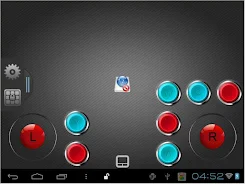


MK802III Remote Client APP
RKM remote was designed specifically for RKM MK802III, MK802IV Mini PC and it is development of a comprehensive application software, it can be installed in android smartphones and MID to control your MK802III, MK802IV Mini PC easily.
The Features:
1. Mouse function: you just need to move the mouse on the surface of the touch area in the RKM Remote software which has been installed in your phone or tablet, it will move the cursor on the screen. Move the cursor to any application icon, click on the surface of the touch area,it will open the application
Virtual keyboard input: it helpsyou to type letters, comes with a full QWERTY keyboard on the touch screen
2. G-Sensor: you can use mobile devices as a controller, play the somatic games on RKM MK802IV.
3. Remote control mode: this option uses basicly same funtionis as real remote control.
자세히 알아보기
The Features:
1. Mouse function: you just need to move the mouse on the surface of the touch area in the RKM Remote software which has been installed in your phone or tablet, it will move the cursor on the screen. Move the cursor to any application icon, click on the surface of the touch area,it will open the application
Virtual keyboard input: it helpsyou to type letters, comes with a full QWERTY keyboard on the touch screen
2. G-Sensor: you can use mobile devices as a controller, play the somatic games on RKM MK802IV.
3. Remote control mode: this option uses basicly same funtionis as real remote control.
 spotify hackeado
  hypic
hypic  notification bar
  remini
  barid bank
  db navigator
  chatgpt
  keyboard
  aimp
aimp  kuku fm
  ထိုင်း မြန်မာဘာသာပြန်
  trenitalia
  helakuru
  discord
  kleinanzeigen
  umax
umax  talkatone
  youtube lite
  animesaturn
  dj dodo


