Why your game is stuck at 60 FPS
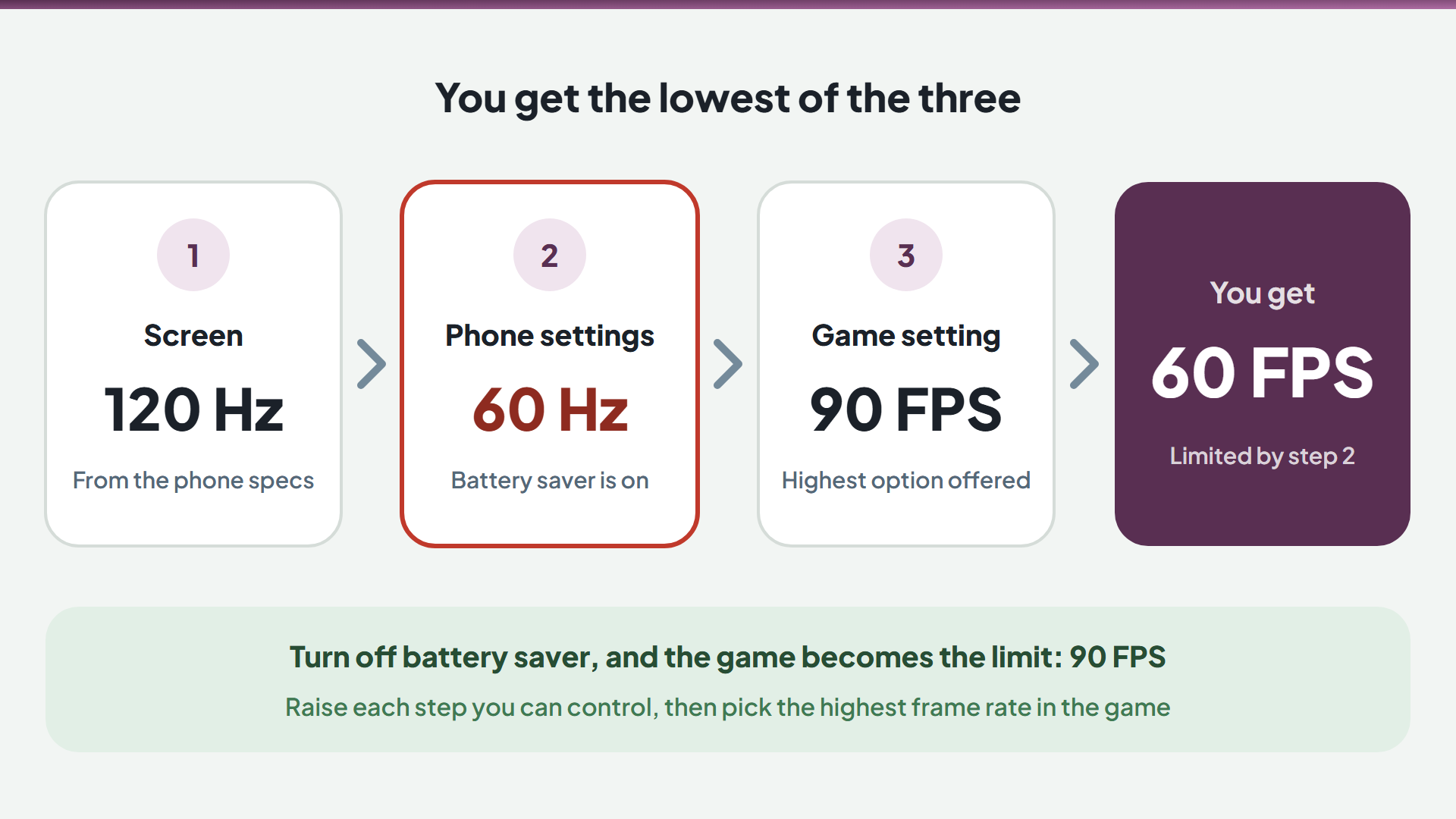
A game can only show as many frames per second as your screen refreshes. A 60 Hz screen shows at most 60 FPS, a 90 Hz screen 90 FPS, and a 120 Hz screen 120 FPS. Even on a 120 Hz phone, three things must all allow the higher rate: the screen setting, the phone’s power settings and the game itself. If any one of them says 60, you get 60.
This guide goes through all three, then explains how to lower the screen resolution without root, which can help a phone keep a steady frame rate. It also explains why “unlock 120 FPS” and GFX tool apps are a bad idea.
The three things that limit your FPS
Step 1: set the screen to its highest refresh rate
First check what your screen supports: it is listed on the phone’s spec page as 60, 90, 120 or 144 Hz. Then set it to the highest mode. Menu names differ by brand and Android version:
| Brand | Where to find it |
|---|---|
| Samsung | Settings › Display › Motion smoothness › Adaptive (or High) |
| Xiaomi, Redmi, POCO | Settings › Display › Refresh rate › High (or 120 Hz) |
| OPPO, realme, OnePlus | Settings › Display & brightness › Screen refresh rate › High |
| Infinix, Tecno, itel | Settings › Display › Screen refresh rate › 120 Hz or Auto |
| Google Pixel | Settings › Display › Smooth Display on |
- Turn off battery saver. On most phones it drops the screen to 60 Hz.
- Check the game booster. Game Space, Game Turbo and similar apps can set a frame rate limit per game. Set it to the highest option or turn the limit off.
- Heat matters. Many phones lower the refresh rate when they get hot, so a long session may fall back to 60 Hz on its own.
Step 2: check the real refresh rate
- Turn on Developer options. Our guide to enabling Developer options shows how (tap Build number seven times).
- Turn on “Show refresh rate”. It is in Developer options on Pixel and many other phones. A small number appears on screen and shows the current Hz.
- Look for “Force peak refresh rate”. Some phones have it in Developer options. It keeps the screen at its highest rate all the time, which uses more battery. If your phone does not have it, the Step 1 setting is enough.
Step 3: choose the frame rate in the game
Games decide which frame rates to offer based on your phone model. If your phone is not on the game’s list, the 90 or 120 FPS option does not appear, even on a 120 Hz screen. Setting names change with updates, but they are usually here:
| Game | Where the setting is | Highest option on supported phones |
|---|---|---|
| PUBG Mobile | Settings › Graphics › Frame rate | 90 FPS, or 120 FPS on a short list of phones |
| Mobile Legends: Bang Bang | Settings › Basic › High frame rate | Up to 120 FPS on some phones |
| Call of Duty: Mobile | Settings › Graphics › Frame rate | Max, or 120 on supported phones |
| Free Fire | Settings › Graphics › High FPS | Higher than 60 on supported phones |
If the option is missing, update the game, turn off battery saver and restart it. Some games only show the highest option at lower graphics quality.
PUBG MOBILEAction · 1412.17 MB · 4.7.0 · APK Download Mobile Legends: Bang BangAction · 146.31 MB · 2.2.23.12351 · XAPK Download

Change the screen resolution without root
Lowering the resolution does not unlock higher frame rates in a game, but it reduces the work for the graphics chip. On some phones that means a steadier frame rate and less heat. Samsung phones with a QHD+ screen have this built in (Settings › Display › Screen resolution). On other phones you can do it in two ways.
With a computer (ADB)
- Turn on USB debugging and connect the phone; our USB debugging guide covers setup.
- Write down your current values with
adb shell wm sizeandadb shell wm density. - Set a lower resolution with the same shape. For a 1080 × 2400 screen,
adb shell wm size 720x1600keeps the same ratio. If text looks too large or too small, adjustadb shell wm density(for example 320). - Go back any time with
adb shell wm size resetandadb shell wm density reset. Restarting the phone does not undo the change, so keep these commands handy.
With an app
Purr changes resolution and density from a simple screen. It does not need root: you give it one permission once with an ADB command that the app shows you. Some resolution apps can use Shizuku instead, so you only need the computer once, or not at all with wireless debugging on Android 11 and newer.
Purr — Rootless Resolution ChaTools · 3.03 MB · 1.3 · APK Download ShizukuTools · 2.48 MB · 13.6.0.r1091.b844bc49 · APK Download

Avoid “unlock 120 FPS” and GFX tool apps
Many apps promise 90 or 120 FPS in any game. They work by editing the game’s settings files, not by changing your screen. That has three problems:
- Ban risk. Games such as PUBG Mobile treat modified files as cheating and can ban the account.
- It often does nothing. Android 11 and newer block apps from writing to other apps’ data folders, and the frame rate still cannot go above your screen’s refresh rate.
- Ads and permissions. Many of these apps are full of ads or ask for access they do not need.
The settings in Steps 1 to 3 are the safe way to get the highest frame rate your phone and the game support.
Set the screen to its highest refresh rate, turn off battery saver and game booster limits, then pick the highest frame rate in the game’s graphics settings. If the game does not offer 90 or 120 FPS for your phone, no safe tool can add it; lowering the resolution with ADB or Purr can only make the frame rate steadier.
Frequently asked questions
Can I get 120 FPS on a 60 Hz screen?
No. The screen can only show 60 frames per second. A game may run faster internally, but you will not see more than 60.
Why is the 120 FPS option missing in my game?
The game offers it only on phone models it has tested. Battery saver, an old game version or high graphics quality can also hide it.
Does a higher refresh rate use more battery?
Yes. 120 Hz uses noticeably more power than 60 Hz. Adaptive modes save battery by lowering the rate when the screen is not moving.
Do I need root to change resolution?
No. ADB’s wm size command and apps like Purr work without root. You need a computer once to give the permission, or Shizuku with wireless debugging.
Will a GFX tool get me banned?
It can. Games treat edited settings files as cheating, and PUBG Mobile in particular has banned accounts for it. Use the game’s own settings instead.
Reviews and ratings
Your comment was submitted and is awaiting moderation.
Your comment was published.