Why 32-bit and 64-bit matter on Android
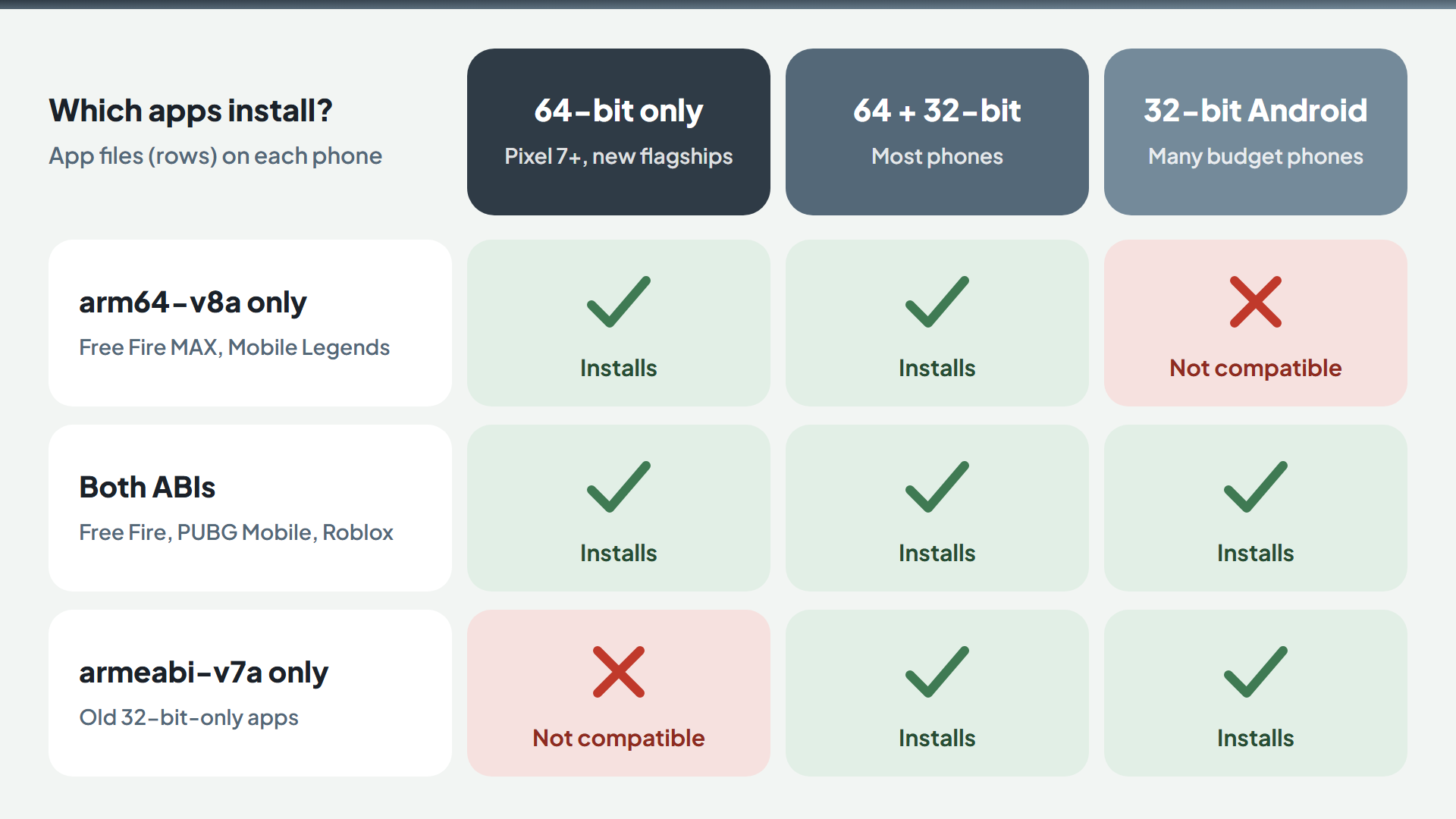
Every Android app that uses native code is built for one or more processor types, called ABIs. If an app has no files for the ABI your phone runs, it will not install: you see “App not installed”, “Your device isn’t compatible with this version”, or, through ADB, INSTALL_FAILED_NO_MATCHING_ABIS. This happens in both directions. Older 32-bit-only apps fail on the newest phones, and new 64-bit-only games fail on budget phones that still run 32-bit Android.
This guide explains the difference, shows how to check what your phone supports in under a minute, and lists what to do when an app or game does not match.
The four Android ABIs
| ABI | What it is | Where you find it |
|---|---|---|
| arm64-v8a | 64-bit ARM | Almost every phone sold in the last few years |
| armeabi-v7a | 32-bit ARM | Older phones, and many budget phones that run 32-bit Android on a 64-bit chip |
| x86_64 | 64-bit Intel/AMD | Emulators on a PC, some Chromebooks |
| x86 | 32-bit Intel | Old emulators and a few old Intel tablets |
Two facts surprise most people:
- A 64-bit chip does not mean 64-bit Android. Many low-cost phones with 2 GB or 3 GB of RAM ship a 32-bit system to save memory, so they can only install armeabi-v7a apps even though the processor is 64-bit.
- The newest phones dropped 32-bit. Google Pixel phones from the Pixel 7 onward and many 2024–2025 flagships run 64-bit only. Old 32-bit-only apps and games simply do not install on them.
How to check if your phone is 32-bit or 64-bit
- Install CPU-Z or AIDA64. Both are free and show your processor and system details.
- Find the Supported ABIs line. In AIDA64 it is in the CPU section. CPU-Z shows the Kernel Architecture on its System tab, but a 64-bit kernel (aarch64) can still run a 32-bit system, so the Supported ABIs list is the line to trust.
- Read the result. If the list starts with
arm64-v8a, your Android is 64-bit. If it shows onlyarmeabi-v7a(and maybearmeabi), your Android is 32-bit. Ifarmeabi-v7ais missing from a 64-bit list, the phone is 64-bit only.

Popular games: which ones need 64-bit
Each app page on APKCombo lists an Architecture line. Here is what it showed for some of the most searched games when this guide was written:
| Game or app | Architectures on APKCombo | Works on 32-bit Android? |
|---|---|---|
| Free Fire | arm64-v8a, armeabi-v7a, x86_64, x86 | Yes |
| Free Fire MAX | arm64-v8a only | No |
| Mobile Legends: Bang Bang | arm64-v8a only | No |
| PUBG Mobile | arm64-v8a, armeabi-v7a, x86_64, x86 | Yes |
| Roblox | arm64-v8a, armeabi-v7a, x86_64, x86 | Yes (Android 8.0 or newer) |
Developers change this over time, so check the Architecture line on the download page before you install. If you are choosing between Free Fire and Free Fire MAX on an older phone, our Free Fire versions guide compares them.
Free FireAction · 389.92 MB · 1.132.1 · XAPK Download Mobile Legends: Bang BangAction · 146.31 MB · 2.2.23.12351 · XAPK Download

What to do when an app does not match your phone
- Download the right variant. Some apps are published as separate files for each ABI. Pick the one that matches the first entry in your Supported ABIs list. APKCombo Installer picks the matching split files automatically when you install an XAPK or APKS file.
- On a 32-bit phone: a 64-bit-only game will not run. Look for a lighter edition that still ships armeabi-v7a (for example Free Fire instead of Free Fire MAX), or an older version that still had 32-bit files. Older versions may stop connecting once the game forces an update.
- On a 64-bit-only phone: an old 32-bit-only app cannot be made to run natively. Check for a newer version of the app, a web version, or an alternative app.
- About “32-bit support” plugins: some virtual-space apps (the kind people search for with VPhoneGaga or VirtualXposed) offer add-ons that run 32-bit apps inside a 64-bit container. They are not made by the app developers, can break at any update, and games often detect them and ban accounts. Do not use them with an account you care about.
If the error is not about the ABI, our guide to the “App not installed” error covers the other causes, such as storage, signature conflicts and Android version.
Check Supported ABIs in AIDA64: arm64-v8a first means 64-bit Android, armeabi-v7a only means 32-bit. Then match the Architecture line on the app page. Free Fire, PUBG Mobile and Roblox still support 32-bit; Free Fire MAX and Mobile Legends need 64-bit Android.
Frequently asked questions
How do I know if my Android is 32-bit or 64-bit?
Install AIDA64 and look at Supported ABIs in the CPU section. If the list starts with arm64-v8a, Android is 64-bit. If it only lists armeabi-v7a, Android is 32-bit, even if the processor itself is 64-bit.
Can I change my phone from 32-bit to 64-bit?
Not with a normal update. The system type is chosen by the phone maker. Only a different firmware from the maker, or a custom ROM, could change it, and most budget phones have no 64-bit firmware.
Does Mobile Legends work on 32-bit Android?
The current version on APKCombo is arm64-v8a only, so it needs 64-bit Android. Older versions with 32-bit files usually stop connecting after the game requires an update.
Why does an old app not install on my new phone?
Many new phones, including Pixel 7 and later, run 64-bit only. An app that only has armeabi-v7a files cannot install on them. Look for a newer version of the app.
What does INSTALL_FAILED_NO_MATCHING_ABIS mean?
The APK has no native code for any ABI your phone supports. Download the variant that matches your phone, or a version of the app that includes your ABI.
Reviews and ratings
Your comment was submitted and is awaiting moderation.
Your comment was published.