What the message is telling you
“App not installed” is Android’s catch-all. Newer versions add a reason after it, and that reason points straight at the fix. Start by matching the exact wording you see.
| What Android says | Most likely cause | Go to |
|---|---|---|
| App not installed as package conflicts with an existing package | A copy of the app with a different signature, or a newer version, is already on the phone | Conflicts |
| App not installed as app isn’t compatible with your phone | Your Android version is too old, the processor type is wrong, or the app is too old for your Android | Not compatible |
| App not installed as package appears to be invalid | The file is damaged, incomplete, or only one piece of a split app | Invalid file |
| There was a problem parsing the package | Same as invalid, or a bundle opened with the wrong installer | Invalid file |
| Your phone isn’t allowed to install unknown apps from this source | The app you opened the file with has no permission to install | Blocked |
| Blocked by Play Protect, or blocked by Auto Blocker | A security feature stopped the install | Blocked |
| Just “App not installed”, no reason | Usually storage, or one of the causes above on older Android | Storage, then the rest |
“Conflicts with an existing package”
Every Android app is signed by its developer, and an update must carry the same signature as the installed copy. If the app is already on the phone from another source, or from a modified build, Android refuses to replace it. The same message often appears when you try to install an older version over a newer one.
- Back up the app’s dataUninstalling deletes local data. Use the app’s own backup or sign in to its cloud sync first.
- Uninstall the existing copySettings › Apps, find the app, tap Uninstall.
- Check hidden copiesIf you use a work profile, Samsung Secure Folder, a dual-app feature or several users on the phone, the app may still be installed there. Remove it in that space too, or use “Uninstall for all users” in the app’s menu where available.
- Install the file againIt now installs as a fresh app.
“Isn’t compatible with your phone”
Three different problems share this message.
| Problem | How to tell | Fix |
|---|---|---|
| Your Android is too old | The app page says “Requires Android 11+” and your phone runs 10 or lower | Pick an older version of the app whose requirement matches your phone |
| Wrong processor type | The file says arm64-v8a only, and your phone is 32-bit (armeabi-v7a), or the file is x86 only | Download the variant for your processor, or a universal APK |
| The app is too old for your Android | Android 14 and later refuse apps built for Android 5.1 or older (target API below 23) | Look for a newer version of the app. There is no setting on the phone that overrides it |
Your Android version is in Settings › About phone › Android version. The processor type is not shown in Settings on most phones; APKCombo Installer reads it for you and picks the matching files automatically.
“Package appears to be invalid” and parsing errors
Android could not read the file as a complete app.
- Download it againAn interrupted download produces a file that looks normal but is cut short. Compare the size with the one on the download page, or check the SHA-256 fingerprint APKCombo lists for every file.
- Check whether it is a bundleXAPK, APKS and APKM files contain several APKs. Android’s own installer cannot open them, and installing only base.apk from inside one also fails. Use a bundle installer.
- Open it from a file managerSome browsers and messaging apps hand over the file in a way the installer cannot read. Open it from Downloads with a file manager instead.

Our guide to installing XAPK, APKS and OBB files covers bundles in detail, and split APKs explained shows why an app can come in pieces.
Blocked by a setting or a security feature
| Block | What to do |
|---|---|
| “Isn’t allowed to install unknown apps from this source” | Tap Settings on the message and turn on “Allow from this source” for the app you opened the file with (browser or file manager). On Android 7 the switch is “Unknown sources” under Security |
| Samsung Auto Blocker | On many newer Galaxy phones it is on by default and blocks installs from outside Galaxy Store and Google Play. Settings › Security and privacy › Auto Blocker. Turn it off to install, then turn it back on |
| Play Protect warning | A warning that the app is from an unknown developer is common for files from outside the store. A warning that names a harmful app is not: cancel. If you trust the file, check its SHA-256 before choosing to install anyway |
| Xiaomi, Redmi, POCO | Installs from installer apps can fail silently. Turning off “MIUI optimization” in Developer options and restarting usually helps. Steps are on the how to install page |
| Work phone or Family Link | An administrator or parent controls installs. Only they can allow it |
Not enough storage, and other quick fixes
An install needs room for the file, the unpacked app and its first data at the same time. Free at least two to three times the file size before trying again. Our guide to fixing a full storage shows where the space usually goes.
- Restart the phone. It clears a stuck package installer more often than you would expect.
- Clear the installer’s cache. Settings › Apps › show system apps › Package installer › Storage › Clear cache.
- Install to internal storage. Files kept on an SD card occasionally fail to install. Move the APK to internal storage first.
Still failing? Read the exact reason with a computer
The phone’s message is a summary. Installing over USB with Android’s adb tool prints the precise error code. Turn on USB debugging, connect the phone and run adb install app.apk.
| adb error | Meaning |
|---|---|
| INSTALL_FAILED_UPDATE_INCOMPATIBLE | Signature differs from the installed copy |
| INSTALL_FAILED_VERSION_DOWNGRADE | Older version over a newer one |
| INSTALL_FAILED_OLDER_SDK | The app needs a newer Android |
| INSTALL_FAILED_NO_MATCHING_ABIS | Wrong processor type |
| INSTALL_FAILED_DEPRECATED_SDK_VERSION | The app is too old for Android 14 and later |
| INSTALL_FAILED_INSUFFICIENT_STORAGE | Not enough space |
| INSTALL_PARSE_FAILED_NO_CERTIFICATES | The file is unsigned or damaged |
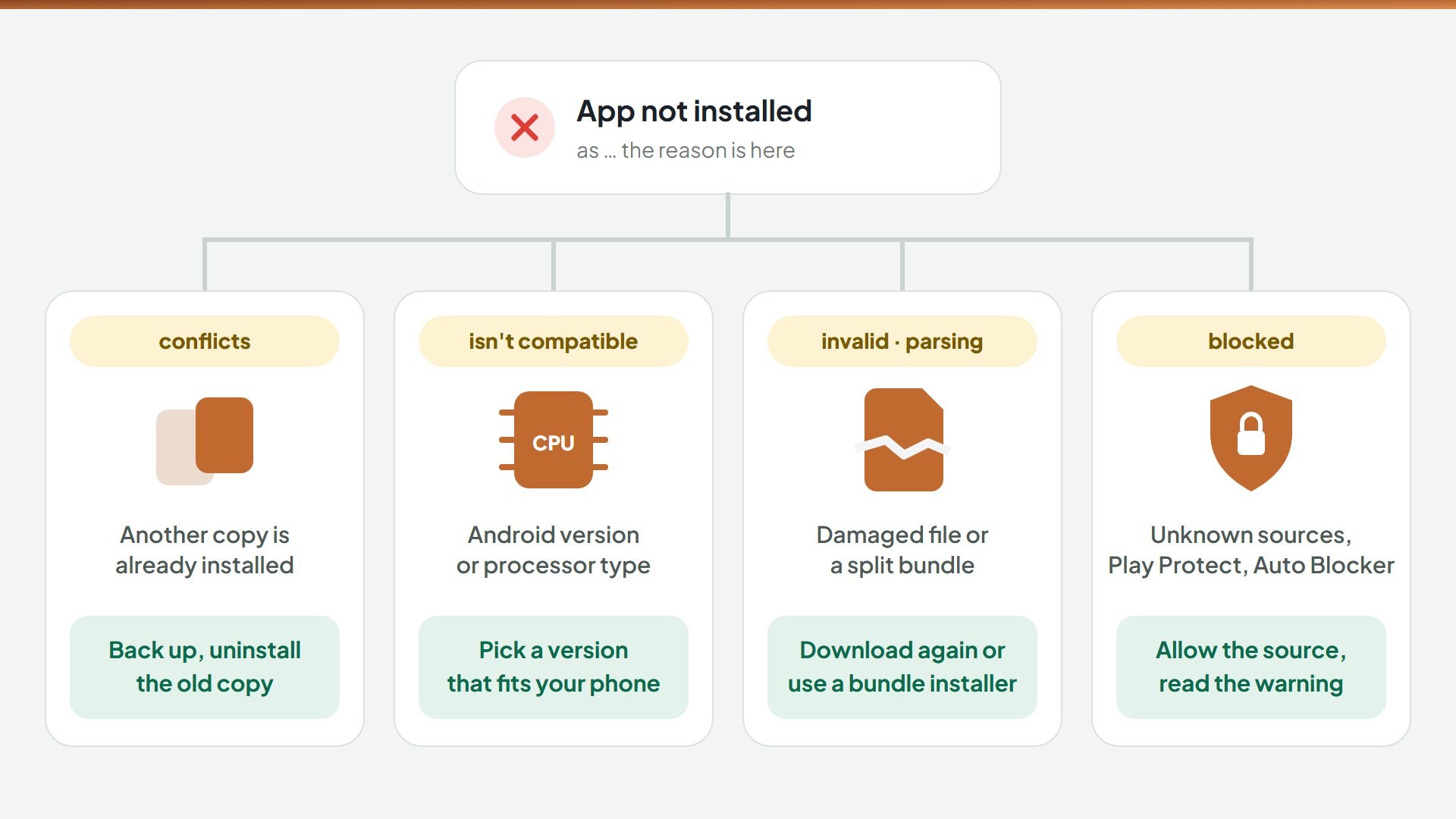
Read the reason after “App not installed”. Conflicts: uninstall the old copy. Not compatible: match Android version and processor. Invalid: download again or use a bundle installer. Blocked: allow the source or read the warning.
Frequently asked questions
Why does an APK install on one phone but not another?
Usually the Android version or processor type. A file built for 64-bit phones with Android 11 or later will not install on a 32-bit phone or on Android 10.
Will I lose my data if I uninstall to fix a conflict?
Yes, local data is deleted with the app. Back up inside the app or make sure it syncs to an account before uninstalling.
Can I install an older version without uninstalling?
No. Android blocks downgrades over a newer installed version. Uninstall first, then install the older one.
Is it safe to tap “Install anyway” on a Play Protect warning?
Only when you trust where the file came from and its SHA-256 matches the one published on the download page. If Play Protect names the app as harmful, do not install it.
Why can’t Android install an XAPK file?
Android’s built-in installer accepts one APK at a time. An XAPK is a bundle of several files and needs a bundle installer such as APKCombo Installer.

Reviews and ratings
Your comment was submitted and is awaiting moderation.
Your comment was published.