What is inside an XAPK, APKS or APKM file
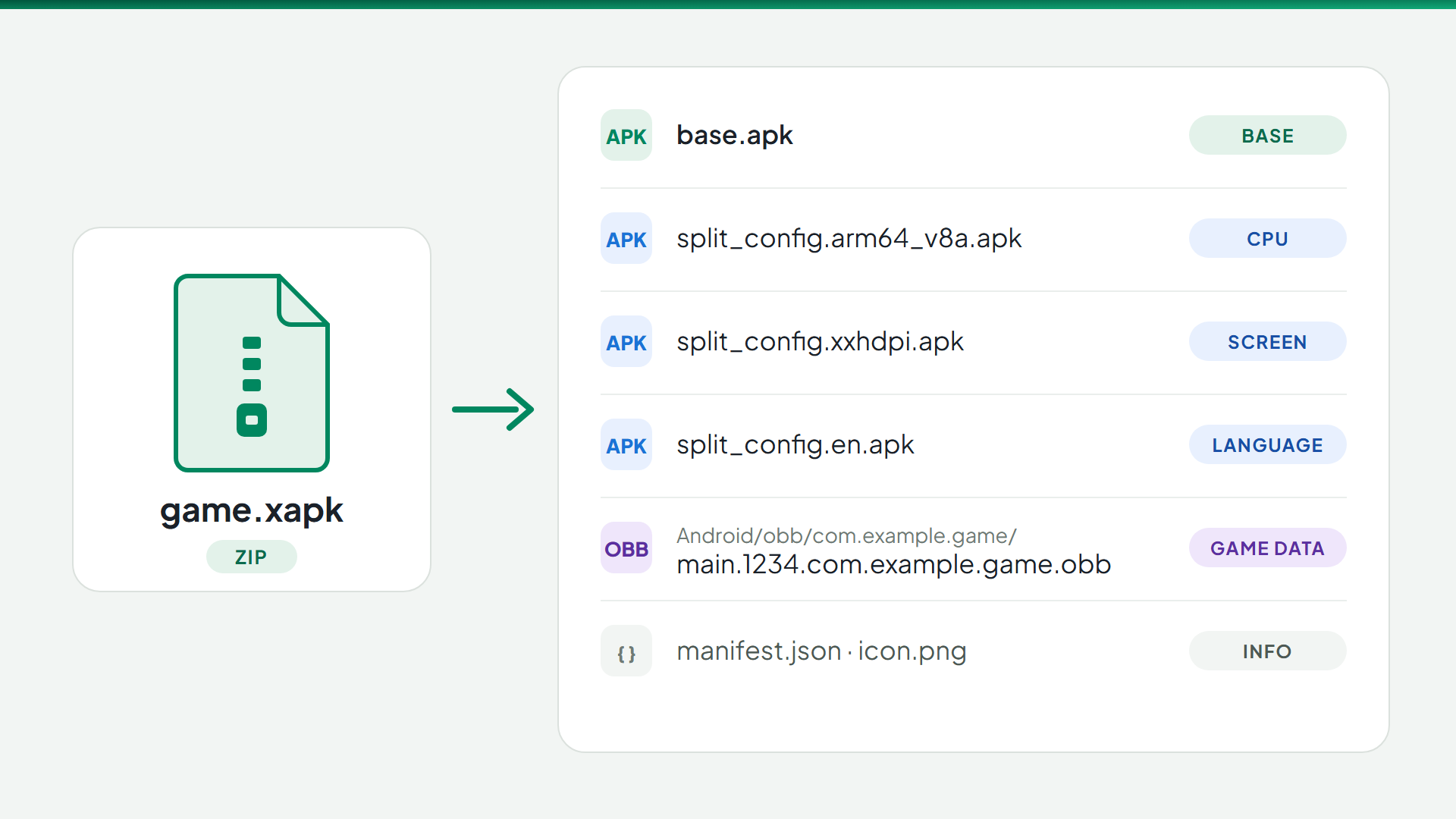
An APK is one installable package. Large apps and most games no longer ship that way. Google Play delivers them in pieces (a base APK plus split APKs for your processor, screen and language) and games often add a large data file called an OBB. Download sites bundle those pieces into a single file so you can save it, and the extension tells you whose bundle format it is.
| File | What is inside | Can Android open it on its own? |
|---|---|---|
| .apk | One complete package | Yes |
| .xapk | A ZIP with the APK or split APKs, and OBB game data when the game has it | No |
| .apks | A ZIP of split APKs, the format Google’s own tools produce | No |
| .apkm | A bundle of split APKs from one particular download site | No |
| .obb | Game data only: graphics, sound, levels. Not installable by itself | No, it is copied to a folder |
The quick way: install with APKCombo Installer
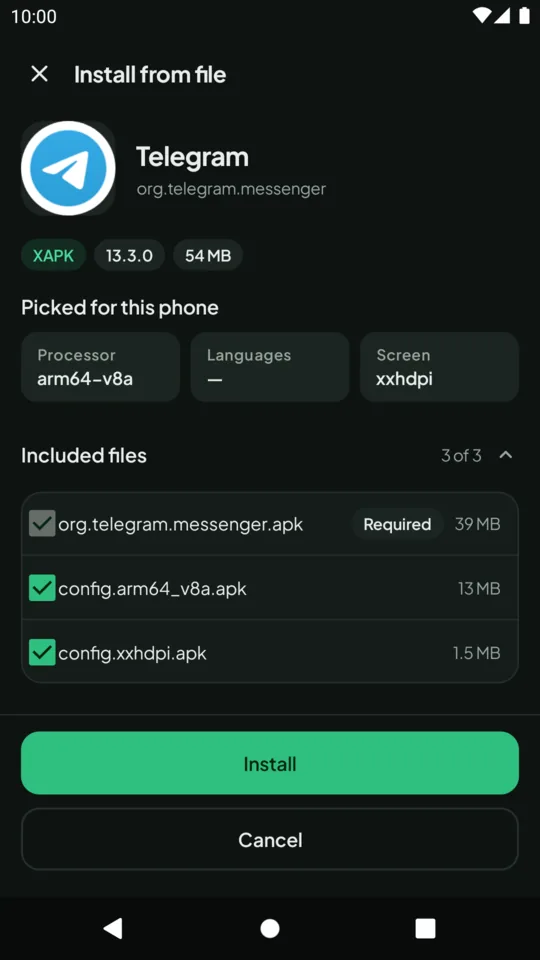
Android’s built-in package installer accepts one APK at a time. A bundle installer opens the XAPK, APKS or APKM, picks the split files that match your phone, installs them together in one session and copies the OBB data where the game expects it. APKCombo Installer is free, needs no root and runs on Android 7.0 and later.
APKCombo InstallerTools · 2.92 MB · 1.0.2 · APK Download
- Download and install APKCombo InstallerOpen the downloaded file. If Android blocks it, tap Settings, turn on “Allow from this source” for your browser, go back and tap Install. On Android 7 the same switch is called “Unknown sources” under Security.
- Let the installer install appsThe first time you open it, it asks for permission to install apps. Tap “Open Android settings”, turn the switch on and go back. Android asks only once.
- Pick your fileOn the home screen tap “Choose a file” and select the .xapk, .apks, .apkm or .apk. If you do not know where it was saved, tap “Find APK & XAPK files” to list every install file on the phone, including those saved by your browser or Telegram.
- Check the files and tap InstallThe installer shows which split files it picked for your processor, screen density and language. Leave the selection as it is unless you know you need something else, then tap Install and confirm on Android’s prompt.
- Open the app or gameFor games with OBB data, the data is already in place when the install finishes. Start the game normally.
Without an installer: an XAPK with one APK and OBB data
Many game XAPKs contain a single APK plus an OBB file. Those you can install by hand with any file manager that opens ZIP files, such as ZArchiver.
ZArchiverTools · 4.94 MB · 1.0.10 · APK Download
- Rename the fileChange
game.xapktogame.zip. If your file manager hides extensions, use its rename option, which usually shows the full name. - Extract itExtract to a folder in Downloads. Inside you will find one .apk file and an Android folder. If you find several .apk files instead, skip to the next section: this method will not work.
- Copy the OBB folder into placeOpen
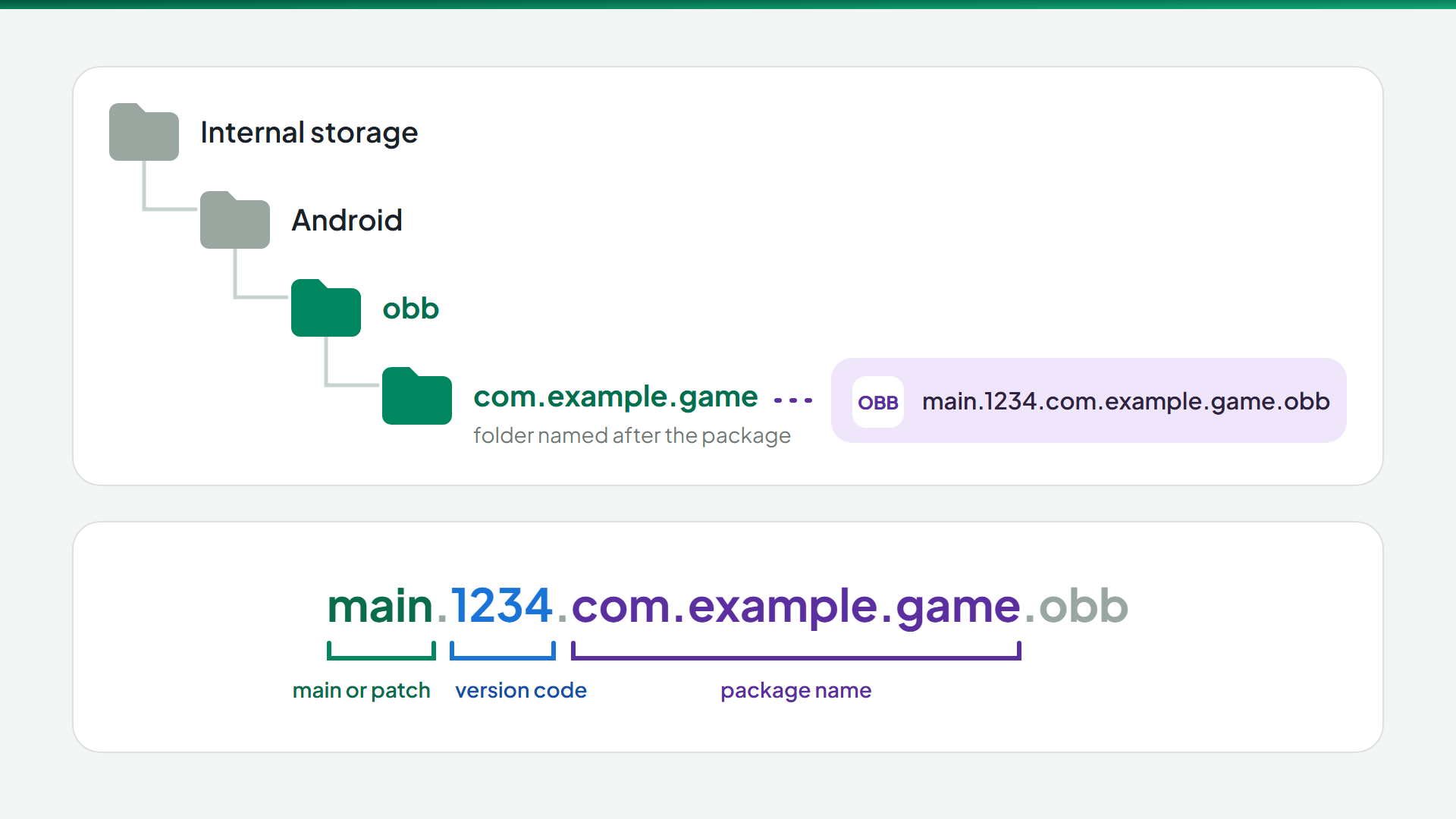
Android/obb/inside the extracted folder. Copy the folder named after the game’s package, for examplecom.example.game, intoAndroid/obb/on your phone’s internal storage. The path must end up exactly as in the picture below. - Install the APKTap the .apk and install it as usual.
- Start the gameIt finds its data and skips the download. If it asks to download data again, the OBB is in the wrong place or belongs to another version.
Without an installer: bundles with several APKs
If the bundle contains a base APK and several files named split_config.*.apk or config.*.apk, tapping them one by one fails, because Android needs them installed together in one session. On the phone, that requires a bundle installer. On a computer you can do it with Android’s own tools.
- Set up the computer onceInstall Google’s Android SDK Platform-Tools, turn on developer options and USB debugging on the phone, and connect it. Our guides on developer options and USB debugging cover each switch.
- Extract the bundleRename .xapk or .apks to .zip and extract it on the computer.
- Install all the pieces in one commandRun
adb install-multiplewith the base APK and the splits for your phone, as in the example below.
adb install-multiple base.apk split_config.arm64_v8a.apk split_config.xxhdpi.apk split_config.en.apkFor a game, copy its OBB data afterwards:
adb shell mkdir -p /sdcard/Android/obb/com.example.game
adb push main.1234.com.example.game.obb /sdcard/Android/obb/com.example.game/
An .apks file made by Google’s bundletool can also be installed directly with java -jar bundletool.jar install-apks --apks=app.apks, which picks the right splits for the connected phone by itself. The install from a PC guide covers the computer side in more detail.
Which split files your phone needs
A bundle can carry splits for every kind of device. You need the base plus one of each kind that matches your phone. Depending on who built the bundle, the names start with split_config. or just config. An installer reads this from the phone automatically. When you install by hand, use this table.
| Split type | Example file | Which one to pick |
|---|---|---|
| Processor (ABI) | split_config.arm64_v8a.apk | arm64-v8a on almost every phone from the last several years. armeabi-v7a on older or 32-bit devices and many TV boxes. x86_64 on emulators and some Chromebooks |
| Screen density | split_config.xxhdpi.apk | xxhdpi suits most modern phones. If unsure, any density works, at the cost of slightly blurrier or larger images |
| Language | split_config.en.apk | Your phone’s language. You can add more than one |
| Feature modules | split_feature_name.apk | Install them all. The app expects them to be present |
When it fails: common errors and their fixes
| What you see | Usual cause | Fix |
|---|---|---|
| “There was a problem parsing the package” | The bundle was opened with Android’s own installer, the download is incomplete, or the app needs a newer Android version | Use a bundle installer, download again, and check the “Requires Android” line on the app page |
| “App not installed” | An installed copy is signed with a different key, you are installing an older version over a newer one, or the file is for another processor | Uninstall the existing copy (back up its data first), or pick the file for your processor |
| “Download failed because the resources could not be found” when the game starts | The OBB file is missing or in the wrong folder | Copy the OBB folder to Android/obb/ with the exact package name |
| The game asks to download its data again | The OBB belongs to another version of the game | Use the APK and OBB from the same XAPK. The version code in the OBB name must match the APK |
| The install stops or says there is no space | The bundle, the extracted pieces and the installed app need room at the same time | Free about three times the file size. See fixing a full storage |
| Nothing happens on a Xiaomi, Redmi or POCO phone | MIUI optimization blocks installs from installer apps | In Developer options, turn off “MIUI optimization” and restart. Steps are on the how to install page |
If the version you need is not the latest, every app page on APKCombo links to its old versions. For example, Roblox old versions. An older version installs over a newer one only after you uninstall the newer one.
Games that come as XAPK
These games on APKCombo download as an XAPK because of their size, and install with the steps above.
Call of Duty: MobileAction · 2330.36 MB · 1.0.60 · XAPK Download GTA: San Andreas - NETFLIXAction · 934.32 MB · 1.86.44544238 · XAPK Download eFootball™Sports · 828.23 MB · 11.1.1 · XAPK Download


Is it safe to install an XAPK file?
The format is a ZIP, so the risk is the same as for any APK: it depends on who built the app inside and whether anyone changed it on the way. Three checks cover most of it.
- Compare the SHA-256. APKCombo publishes the SHA-256 fingerprint of each file on its app page. APKCombo Installer checks it automatically when you download inside the app.
- Update over the store version. If the app is already installed from Google Play and the XAPK installs over it without asking you to uninstall, it is signed with the same developer key as the original.
- Read Play Protect’s warning. Play Protect may scan or warn about apps from outside the store. A warning about the source is normal. A warning that names a harmful app is not: cancel.
Bundle installer for the quick way. Rename to .zip and copy the OBB folder for a single-APK game. adb install-multiple for split bundles on a computer. Never install base.apk on its own.
Frequently asked questions
Can I install an XAPK without an app?
Yes, if it contains one APK: rename it to .zip, extract it, install the APK and copy the OBB folder to Android/obb/. If it contains several APKs, you need a bundle installer on the phone or adb on a computer.
Where do OBB files go on Android?
In Internal storage › Android › obb › the game’s package name, for example Android/obb/com.example.game/main.1234.com.example.game.obb.
Can I convert an XAPK to an APK?
An XAPK with one APK already contains the APK: extract it. Split bundles can be merged into one APK with special tools, but the result has to be re-signed, so it will not update over the original app.
Do I need root to install XAPK or APKS files?
No. Bundle installers use Android’s normal install system. Root is not needed for any method on this page.
Why does the XAPK fail on my phone but work on another?
Usually the processor or Android version. A bundle made for arm64-v8a will not install on a 32-bit phone, and every app has a minimum Android version shown on its APKCombo page.

Reviews and ratings
Your comment was submitted and is awaiting moderation.
Your comment was published.