Is there a PCSX2 APK for Android?
No. PCSX2 is the PlayStation 2 emulator for Windows, Linux and macOS, and its developers have never released an Android version. A file called “PCSX2 APK” is either another emulator renamed or something you should not install.
The PS2 emulator Android players actually use is NetherSX2. It descends from AetherSX2, an Android emulator built in 2021 using parts of the PCSX2 code. AetherSX2’s developer stopped work on it in 2023 and it left Google Play. NetherSX2 is a community-maintained build of AetherSX2 that keeps it working and installable, which is why its package name is still xyz.aethersx2.android.

Will it run on your phone?
PS2 emulation is demanding. The console had unusual hardware, and the phone has to imitate all of it in real time.
| Requirement | What it means |
|---|---|
| 64-bit processor (arm64-v8a) | Required. 32-bit phones and many cheap TV boxes cannot install it |
| Android 8.0 or later | Required |
| Graphics | Vulkan, or OpenGL ES 3.2 as a fallback |
| Speed | A chip around Snapdragon 845 level or newer runs most games at full speed. Lighter games run on less |
| Storage | Each game is roughly 0.7 to 4.5 GB, less if you compress it to CHD |
The BIOS: why you need it and where it comes from
The BIOS is the PS2’s own startup software. NetherSX2 needs it to boot games, and it is not included because Sony owns it. The legal way to get it is to copy it from a PS2 you own, using a BIOS dumping tool on a console that can run homebrew. The result is a file of about 4 MB, usually with a name starting with SCPH.
Game files: ISO and CHD
NetherSX2 plays disc images. Rip your own PS2 discs on a computer with a DVD drive into an ISO file. To save space, convert the ISO to CHD with the chdman tool from the MAME project: a CHD is typically much smaller and plays the same. Keep all games in one folder on the phone, for example NetherSX2/games. Archives such as ZIP or RAR must be extracted first.
Setting up NetherSX2 step by step
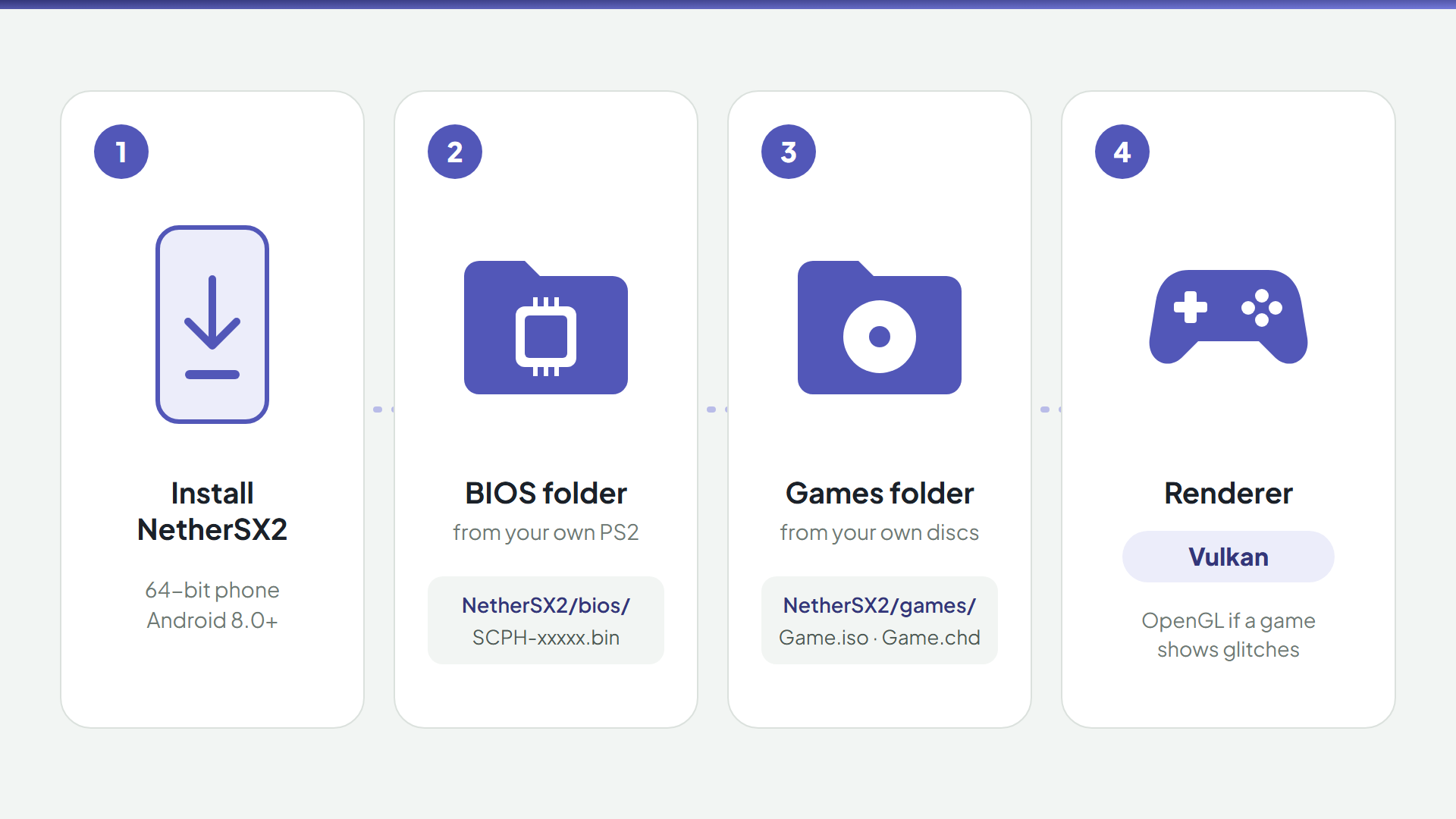
- Install the appDownload the NetherSX2 APK and open it. If Android blocks it, allow your browser to install apps and tap Install. Our installing guide explains the permission screens.
- Put the BIOS in its own folderCreate a folder such as
NetherSX2/biosand copy your BIOS file into it. - Run the setup wizardOn first launch NetherSX2 asks for the BIOS. Choose the folder, not the file inside it, and pick your BIOS from the list. You can change it later in Settings › System › BIOS.
- Add your game folderPoint the game directory to the folder with your ISO or CHD files. The games appear in the library with their covers once scanned.
- Pick a renderer and controlsChoose Vulkan. Touch controls appear on screen, and a Bluetooth controller connects through Android’s Bluetooth settings and works straight away in most cases.
Settings that make the biggest difference
| Setting | Start with | Why |
|---|---|---|
| Renderer | Vulkan | Faster on most Adreno and Mali GPUs. Switch a single game to OpenGL if it shows graphical glitches |
| Internal resolution | 1x on older phones, 2x (about 720p) mid-range, 3x (about 1080p) flagship | The setting with the largest effect on speed |
| EE cycle rate / skip | Default | Raising the skip can rescue a slow game but may cause bugs in others. Change it per game |
| Frame limiter | On | Keeps games at their real speed |
| Per-game settings | Use them | A setting that fixes one game can break another |
Common problems
| Problem | Fix |
|---|---|
| “No BIOS found” | Select the folder that contains the BIOS, not the file, and check that the app has storage permission |
| Black screen or broken graphics | Switch that game to OpenGL, or back to Vulkan |
| Slow or stuttering | Lower the internal resolution, close other apps and let the phone cool down. Phones slow themselves when hot |
| Game missing from the library | Check the game folder is added and the file is ISO, CHD or another disc image, not a ZIP |
| App will not install | The phone is 32-bit or runs Android older than 8.0 |
If your phone is too slow for PS2
Many PS2 series also had PSP versions, and PSP emulation runs well on almost any phone. PPSSPP is the long-standing, open-source PSP emulator, and it works the same way: you supply your own game files.
PPSSPP - PSP emulatorAction · 23.91 MB · v1.20.4 · XAPK Download
There is no PCSX2 for Android. Install NetherSX2, give it the BIOS and games from your own PS2, start with Vulkan at 2x resolution and adjust per game.
Frequently asked questions
Is NetherSX2 the same as AetherSX2?
It is a community-maintained build of AetherSX2, which is why it uses the same package name. AetherSX2 itself has not been updated since 2023.
Is it legal to use a PS2 emulator?
Emulators themselves are legal in most countries. The BIOS and the games are copyrighted, so dump them from a console and discs you own.
Which BIOS version should I use?
The one from your own console. A BIOS from the same region as your games (USA, Europe or Japan) avoids most compatibility problems.
Does NetherSX2 work on Android TV?
Only on 64-bit TV boxes with a strong GPU, which most TV boxes are not. A phone or an Android gaming handheld is a better choice.
Why is a game slow on a new phone?
Some PS2 games are much heavier than others, and phones slow down when they get hot. Lower the resolution for that game and play with the phone out of its case.
Reviews and ratings
Your comment was submitted and is awaiting moderation.
Your comment was published.