What is Smart Panel?
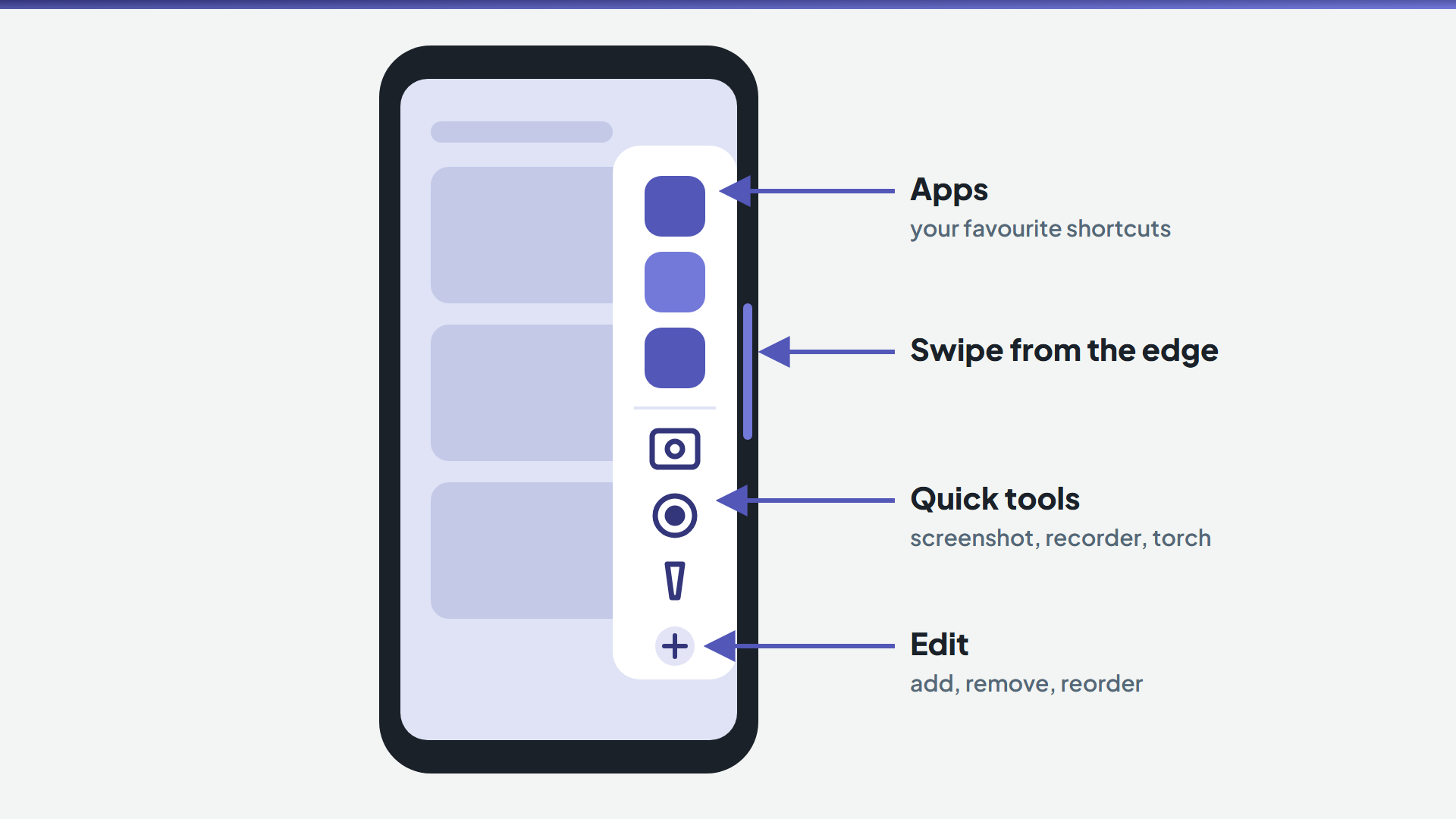
Smart Panel is the sidebar built into Infinix, Tecno and itel phones. All three brands belong to Transsion, and the app (package com.transsion.smartpanel) comes from its software team. Swipe in from the edge of the screen and a floating panel opens with your favourite apps and a few quick tools, on top of whatever you are doing.
Do not confuse it with Epson Smart Panel, a printer app with the same name. If you have an Infinix, Tecno or itel phone and want the sidebar back, this guide is for you; if you want to print from an Epson printer, you need Epson’s app instead.
Smart PanelTools · 86.03 MB · 15.2.1.052 · APK Download
How to turn Smart Panel on
- Open SettingsOn Infinix (XOS) look for Smart Assistance or Special Functions. On Tecno (HiOS) and itel the section has a similar name. If you cannot find it, search the settings for “Smart Panel”.
- Turn on Smart PanelSwitch it on. A thin handle appears on the right or left edge of the screen.
- Open the panelSwipe in from the handle. Swipe it back or tap outside to close it.
- Adjust the handleIn the same settings page you can usually move the handle to the other side, change its height and make it more or less transparent.
Add your own apps and tools
Open the panel and tap Edit (often a pencil or a + button at the bottom). From there you can:
- Add apps you open often, such as WhatsApp, the camera or the calculator.
- Add tools such as screenshot, screen recorder, flashlight or a floating window, depending on your model.
- Reorder or remove items by dragging them.
Some apps opened from the panel can run in a small floating window, so you can, for example, reply to a message while watching a video. Which apps support it depends on the phone and the XOS or HiOS version.
How to update Smart Panel
Smart Panel is a system app. Normally it updates together with your phone’s software (Settings › System update) or through the phone maker’s own app store. If you want a newer version sooner, or you uninstalled its updates, you can install the APK:
- Check your Android versionSettings › About phone. The current Smart Panel on APKCombo needs Android 12 or later. For older phones, pick an older Smart Panel version that matches.
- Download the APKFrom the Smart Panel page on APKCombo.
- Install it as an updateOpen the file and confirm. It installs over the built-in version and keeps your settings, because both carry Transsion’s signature.
XArena, Freezer and other Transsion tools
| App | What it does |
|---|---|
| Smart Panel | Sidebar with app shortcuts and quick tools, everywhere in the system |
| XArena (Infinix) | Game space: collects your games and adds a game toolbar with performance modes and notification blocking while you play |
| Freezer (Infinix) | “Freezes” apps you rarely use so they stop running in the background, and can hide them from the home screen |
| Hi Theme (Tecno) | Theme store for wallpapers, icons and fonts on Tecno phones |
Like Smart Panel, these are system apps tied to Transsion phones and usually update with the phone’s software.
Smart Panel not showing or not working
| Problem | Fix |
|---|---|
| No handle on the screen edge | Turn Smart Panel off and on again in Settings. Check that the handle’s transparency is not set to fully invisible |
| The option is missing from Settings | Smart Panel may be disabled. Settings › Apps › show system apps › Smart Panel › Enable. If it is not listed, its updates may have been removed; install the APK as described above |
| “Smart Panel keeps stopping” | Settings › Apps › Smart Panel › Storage › Clear cache, then restart. If it continues, install the latest version over it |
| “App not installed” | Usually the Android version is too old for this release, or the phone is not a Transsion phone. See what each install error means |
| Panel disappears after a while | Battery saving can stop it. Settings › Battery › App launch (or similar) › Smart Panel: allow it to run in the background |
If a new version misbehaves, you can go back to the one that worked; our guide to downgrading an Android app explains how.
Smart Panel is the edge sidebar of Infinix, Tecno and itel phones. Turn it on in Settings › Smart Assistance, customise it with the Edit button, and update it with the phone’s system update or by installing the newer APK over the built-in one. It does not work on other brands, and it is not Epson’s printer app of the same name.
Frequently asked questions
What is Smart Panel on Infinix?
It is the built-in sidebar of Infinix, Tecno and itel phones. Swiping from the screen edge opens a panel with app shortcuts and quick tools such as screenshot and screen recorder.
How do I update Smart Panel?
Install your phone’s system updates, or download the latest Smart Panel APK and install it over the built-in version. The current version needs Android 12 or later.
Can I install Smart Panel on a Samsung or Xiaomi phone?
No. Smart Panel needs Transsion’s XOS or HiOS system. On other phones, use their own sidebar feature, such as Samsung’s Edge panels.
Is Smart Panel the same as Epson Smart Panel?
No. Epson Smart Panel is a printer app. Transsion’s Smart Panel is the phone sidebar described in this guide. They only share the name.
Why did Smart Panel disappear after an update?
The update may have turned it off or reset its handle. Check Settings › Smart Assistance › Smart Panel, and make sure the app is enabled in the app list.

Reviews and ratings
Your comment was submitted and is awaiting moderation.
Your comment was published.