
What are Douyin and Kuaishou?
Douyin (抖音) is ByteDance’s short-video app for mainland China, and TikTok is the international version built from it. That is why Douyin is often called “Chinese TikTok”. Kuaishou (快手) is China’s second-largest short-video app, from a different company, and its international version is called Kwai.
Neither is on Google Play, because Google Play does not operate in China. Outside China, the only way to install them on Android is from the APK file. Douyin’s package name is com.ss.android.ugc.aweme and Kuaishou’s is com.smile.gifmaker. Both differ from TikTok (com.zhiliaoapp.musically), so you can have Douyin, Kuaishou and TikTok on the same phone.


How Douyin, Kuaishou and TikTok differ
| TikTok | Douyin (抖音) | Kuaishou (快手) | |
|---|---|---|---|
| Company | ByteDance | ByteDance | Kuaishou Technology |
| Interface language | Many languages | Chinese only | Chinese only |
| Install on Android | Google Play or APK | APK only | APK only |
| Account | TikTok’s own | Phone number, separate Douyin account | Phone number, WeChat or QQ |
| Content | Videos from around the world | Chinese trends: fashion, food, short dramas, live shopping | Everyday life, rural China, live streams, short dramas |
| In-app payments | Google Play | Alipay, WeChat Pay | Alipay, WeChat Pay |
| International version | It is the international version | TikTok | Kwai |

How to install Douyin and Kuaishou on Android
- Download the APKTap Download on the Douyin or Kuaishou page on APKCombo. Each file is a few hundred megabytes, so use Wi-Fi and keep at least 1.5 GB free for the download and the installed app.
- Allow installs from unknown sourcesOpen the downloaded file. If Android blocks it, tap Settings, turn on “Allow from this source” for your browser, then go back and tap Install.
- Open the app and accept the termsOn first launch the app shows a privacy policy dialog. The accept button is 同意, usually the highlighted one. The other button (不同意) closes the app.
- Choose permissionsThe app asks for notifications, location, contacts, camera and microphone. Allow camera and microphone only if you want to record videos. You can refuse location and contacts and still watch normally.
Sign up with a non-Chinese phone number
Douyin’s login screen defaults to a Chinese number (+86). To use your own country’s number:
- Open the login screenTap 我 (Me) at the bottom right. If the app offers one-tap login with the phone’s number, choose login with another number (其他手机号登录).
- Change the country codeTap +86 in front of the number field, then search for your country or type its code, and select it.
- Enter your number and request a codeEnter the number without the leading 0. Tick the terms box (已阅读并同意), then tap 获取验证码 (Get verification code).
- Enter the codeType the 4 to 6 digit code from the SMS. If it does not arrive within a minute, try again or choose a voice code (语音验证码) if offered.
Kuaishou works much the same: tap 登录 (Log in), choose phone number login and change the country code. Whether foreign numbers receive a code changes over time in both apps. If you cannot sign up, you can still watch without an account, or use Kwai or TikTok.
Using the Chinese interface: the main buttons
Douyin and Kuaishou have no option to switch the interface to another language. The layout is close to TikTok, so you only need to recognise a few words. For anything else, use Google Lens or your phone’s screen translation. Tab names and order can differ slightly between versions.
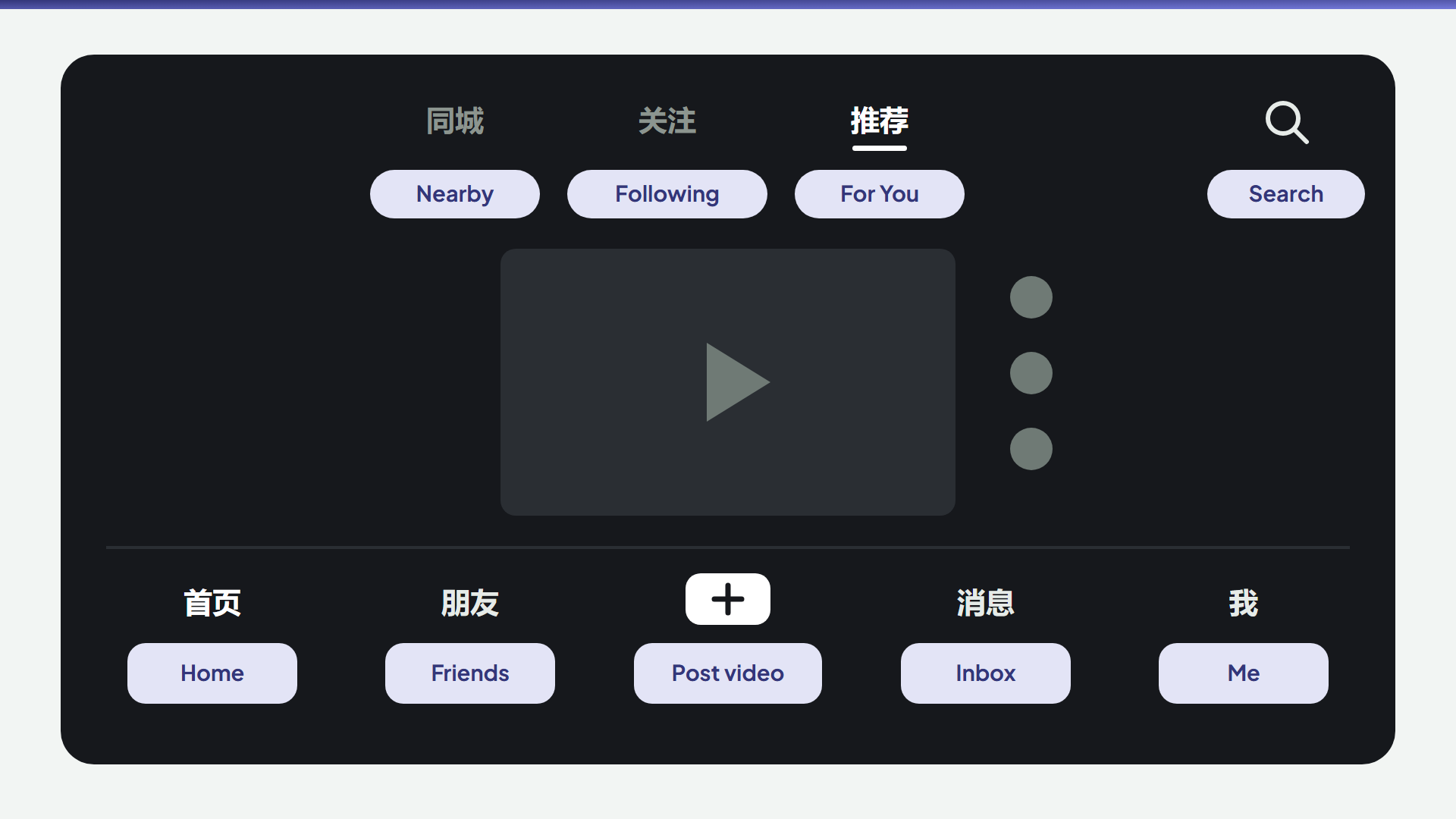
| Button | Meaning | Used for |
|---|---|---|
| 首页 | Home | Scrolling videos |
| 推荐 | For You | Videos picked by the algorithm, like TikTok’s For You |
| 关注 | Following | Videos from accounts you follow |
| 同城 | Nearby | Videos by location. Outside China this tab is often nearly empty |
| 朋友 / 精选 | Friends / Featured | Douyin uses 朋友, Kuaishou uses 精选 |
| 消息 | Inbox | Messages and notifications |
| 我 | Me | Your profile, liked (喜欢) and saved (收藏) videos |
| 直播 | Live | Live streams |
| 搜索 | Search | The magnifier at the top. Accepts Chinese or English |
| 分享 | Share | The arrow on the right of a video. 保存本地 saves it to your phone |
| 设置 | Settings | In the three-line menu on the 我 page |

How to update Douyin and Kuaishou
Because they are not installed from Google Play, Douyin and Kuaishou do not update like normal apps. There are two ways:
- Install the new version over the old oneDownload the latest version from APKCombo and install it as usual. There is no need to uninstall first, so your login and saved videos stay. APKCombo Installer also tells you when a new version is out.
- Use the in-app update promptWhen a new version is out, the app may show a dialog with a 立即更新 (Update now) button. It downloads from Douyin’s or Kuaishou’s own servers in China, which can be slow abroad.
If a new version misbehaves on your phone, you can go back to an older Douyin version or an older Kuaishou version. See also how to update apps not installed from Google Play.
Common problems
| What happens | Fix |
|---|---|
| “App not installed” | Usually not enough storage, or an unfinished download. Free up space and download again. See what each install error means |
| No verification code arrives | Check you chose the right country code and dropped the leading 0. Wait a few minutes and retry. If it still fails, use the app without logging in |
| Videos load slowly or freeze | The servers are in China, so speed depends on your connection. Try another Wi-Fi or lower the video quality in settings |
| A 实名认证 prompt appears | That feature needs Chinese identity verification. Close the prompt to keep watching |
| The app crashes on launch | Update to the latest version. On older phones, try an older version |
CapCut also has a mainland-China edition. See CapCut China (Jianying) if you want the templates trending on Douyin.
Douyin and Kuaishou are China’s two biggest short-video apps: APK only, Chinese interface, and sign-up with foreign numbers that works only some of the time, but watching needs no account. Install the original apps, keep the button table above handy, and update by installing the new version over the old one.
Frequently asked questions
Is Douyin available in English?
No. Douyin and Kuaishou only have a Chinese interface. Use the button table in this guide or Google Lens to translate the screen.
Can I use Douyin without an account?
Yes. You can scroll and watch videos without logging in. An account is only needed to like, comment, follow, post or watch some live streams.
Does a TikTok account work on Douyin?
No. Douyin and TikTok are separate apps with separate accounts. You need to register a Douyin account with a phone number.
What is the difference between Kuaishou and Kwai?
Kuaishou is the mainland-China app with a Chinese interface and Chinese content. Kwai is the same company’s international app, available in many languages and easier to sign up for. Accounts are not shared.
Is it safe to install Douyin from an APK?
The original app is published by ByteDance and, like any social app, collects usage data under its policy. The bigger risk is modified builds sold as “Mod” or “no ads”. Install only the original and check the SHA-256 on the download page.


Reviews and ratings
Your comment was submitted and is awaiting moderation.
Your comment was published.