
What is CapCut China?
“CapCut China” is the name many people use for Jianying (剪映), ByteDance’s video editor for mainland China. Jianying came first, and CapCut is the international version built from it. The two apps look and work very much alike, but they are separate products: accounts, music libraries, templates and paid plans are all different.
Jianying is not on Google Play, because Google Play does not operate in China. Outside China, the only way to install it on Android is from the APK file. Its package name is com.lemon.lv, while international CapCut is com.lemon.lvoverseas, so you can have both on the same phone.

How Jianying differs from international CapCut
| CapCut | CapCut China (剪映) | |
|---|---|---|
| Interface language | Many languages | Chinese only |
| Install on Android | Google Play or APK | APK only |
| Account | TikTok, Google, Facebook | Douyin or phone number |
| Templates | Global TikTok trends | Douyin trends, with many new templates |
| Music library | Music licensed for TikTok | Douyin music, which may be muted when posted elsewhere |
| Auto captions | Many languages | Mainly Chinese and English |
| Paid plan | CapCut Pro through Google Play | Jianying membership (会员), paid with Alipay or WeChat Pay |

How to download and install CapCut China on Android
- Download the APKTap Download on the Jianying (剪映) page on APKCombo. The file is about 400 MB, so use Wi-Fi and keep at least 1.5 GB free for the download and the installed app.
- Allow installs from unknown sourcesOpen the file. If Android blocks it, tap Settings, turn on “Allow from this source” for your browser, then go back and tap Install.
- Open the app and accept the termsOn first launch Jianying shows a privacy policy dialog. The accept button is 同意 (usually the highlighted one). The app then asks for access to photos and videos so you can pick your clips.
- Start editingTap 开始创作 (Start creating) to make a new project and pick videos from your phone.
Do you need to log in?
Basic editing, such as cutting, joining, adding text and filters and exporting, works without an account. Some features need one: cloud drafts, some templates and the AI tools.
Jianying logs in with a Douyin account or a phone number. The login screen lets you change the country code, but whether a foreign number receives a verification code changes over time, and some features also require Chinese identity verification. Do not buy or borrow someone else’s account: you can lose access at any time.
Using the Chinese interface: the main buttons
Jianying has no option to switch to another language. The buttons sit almost where they do in CapCut, so if you know CapCut you only need a few words. For anything else, use Google Lens or your phone’s screen translation.
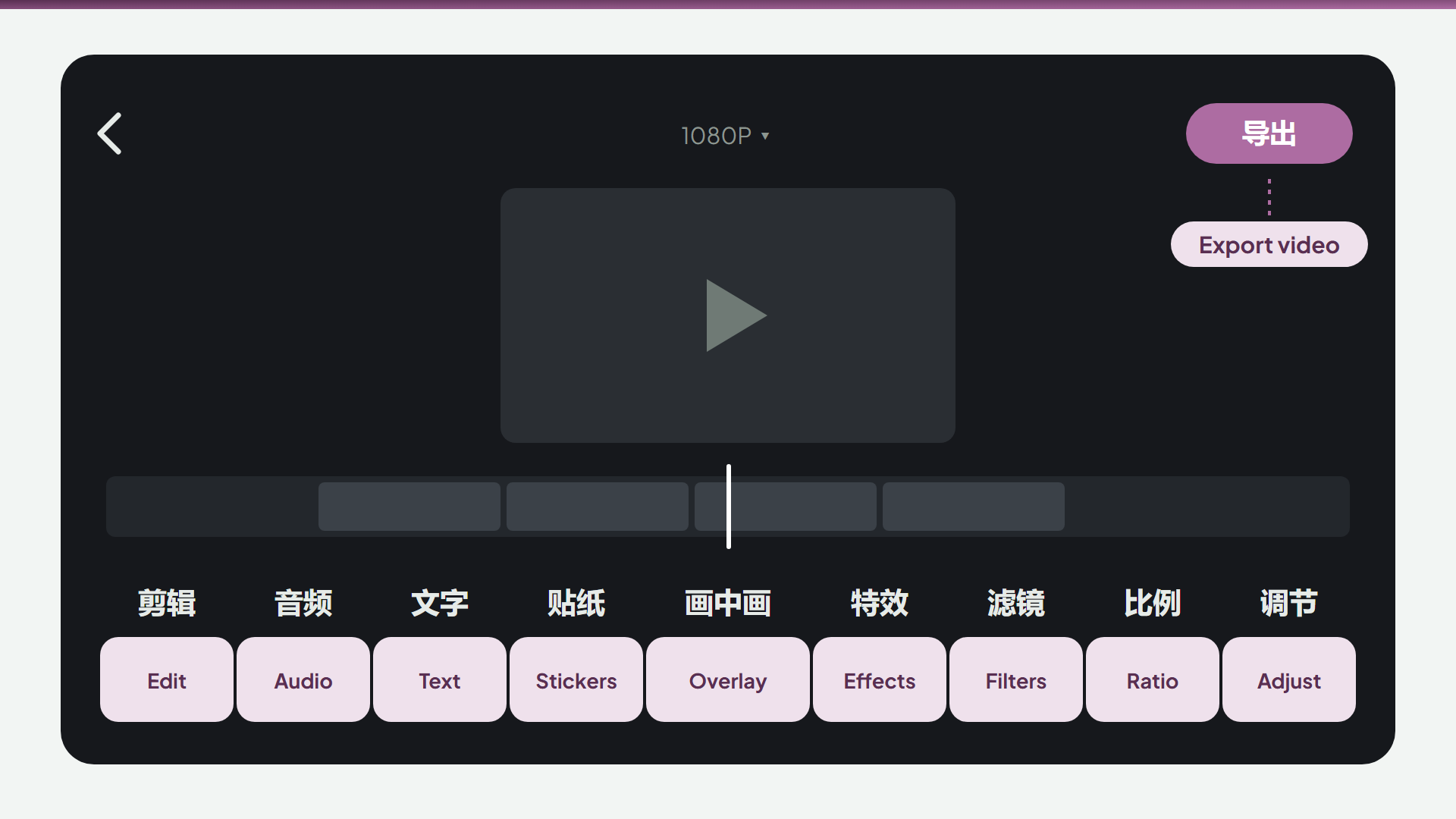
| Button | Meaning | Used for |
|---|---|---|
| 开始创作 | Start creating | New project |
| 剪同款 | Use template | The template library |
| 一键成片 | One-tap video | The app builds a video from photos and clips you pick |
| 剪辑 | Edit | Split (分割), delete (删除), speed (变速), reverse (倒放) |
| 音频 | Audio | Music, sound effects, voice-over |
| 文字 | Text | Add text. 识别字幕 is auto captions |
| 贴纸 | Stickers | Stickers and emoji |
| 画中画 | Overlay | Picture in picture: a second video or photo over the main one |
| 特效 / 滤镜 | Effects / Filters | Visual effects and colour |
| 比例 / 背景 | Ratio / Background | Switch between 9:16, 16:9 and 1:1, and set the background |
| 调节 | Adjust | Brightness, contrast, saturation |
| 导出 | Export | Save the video. Pick 分辨率 (resolution) and 帧率 (frame rate) |
| 我的 / 设置 | Me / Settings | Account and app settings |
Export without the Jianying ending
Like CapCut, Jianying can add an ending clip (片尾) with its logo to your video.
- Delete the ending in the projectScroll the timeline to the end, select the clip with the 剪映 logo and tap 删除 (Delete).
- Turn off the automatic endingIn Settings (设置), find 自动添加片尾 and turn it off. Its place may differ between versions.
- Choose quality and exportTap 导出 at the top right, choose 1080p and 30 or 60 frames per second, and export. The video is saved to your gallery.
Templates (剪同款) and some assets may carry a logo or require credit. Editing from scratch is the surest way to avoid a logo.
Common problems
| What happens | Fix |
|---|---|
| “App not installed” | Usually not enough storage or an unfinished download. Free up space and download again. See what each install error means |
| The app crashes on launch | Update to the latest version. On weaker phones, try a lighter older version |
| No login code arrives | Foreign numbers are not always accepted. Use the app without logging in, or use international CapCut |
| Music is muted when posted to TikTok or Instagram | Douyin music is not licensed for every platform. Use the platform’s own music or royalty-free tracks |
Want the Douyin app itself? See Douyin and Kuaishou on Android.
Jianying (剪映) is CapCut for mainland China: lots of Douyin templates and effects, a Chinese interface, and APK-only installs. Install the original, keep the button table above, and use international CapCut when you need captions in your language.
Frequently asked questions
Is CapCut China free?
Yes. Most editing tools are free. Some templates, effects and AI tools carry a membership (会员) badge and need payment with Alipay or WeChat Pay.
Does CapCut China have English?
No. Jianying only has a Chinese interface. Use the button table in this guide or Google Lens.
Will installing CapCut China replace my CapCut?
No. The two apps have different package names (com.lemon.lv and com.lemon.lvoverseas), so they install side by side without affecting each other’s projects.
Is CapCut China safe?
The original is published by a ByteDance subsidiary and, like any social app, collects usage data under its policy. The bigger risk is modified “Pro” or “Mod” builds. Install only the original and check the SHA-256 on the download page.
Is there CapCut China for iPhone?
Yes, in the Chinese App Store, so you need an Apple Account set to mainland China to download it. This guide covers Android.


Reviews and ratings
Your comment was submitted and is awaiting moderation.
Your comment was published.