Which Free Fire versions exist?
Garena publishes three Free Fire apps for Android. They share the same game, but they differ in graphics, the phones they support and who can play them:
| Free Fire | Free Fire MAX | Advance Server | |
|---|---|---|---|
| What it is | The original game | The same game with better graphics | A test version of the next update |
| Package | com.dts.freefireth | com.dts.freefiremax | com.dts.freefireadv |
| 32-bit phones | Supported | Not supported (64-bit only) | Depends on the test build |
| Download size | About 390 MB, plus in-game data | About 410 MB, plus more in-game data | About 900 MB |
| Your account | Shared with MAX | Shared with Free Fire | Separate; progress is not kept |
| Who can play | Everyone | Everyone | Only players with an activation code |
Thanks to Garena’s Firelink, Free Fire and Free Fire MAX use the same account, and players on both versions meet in the same matches. Your characters, skins and diamonds are the same in both.
Free FireAction · 389.92 MB · 1.132.1 · XAPK Download Free Fire MAX: Storm ArenaAction · 407.72 MB · 2.133.1 · XAPK Download

Free Fire or Free Fire MAX: which one to install
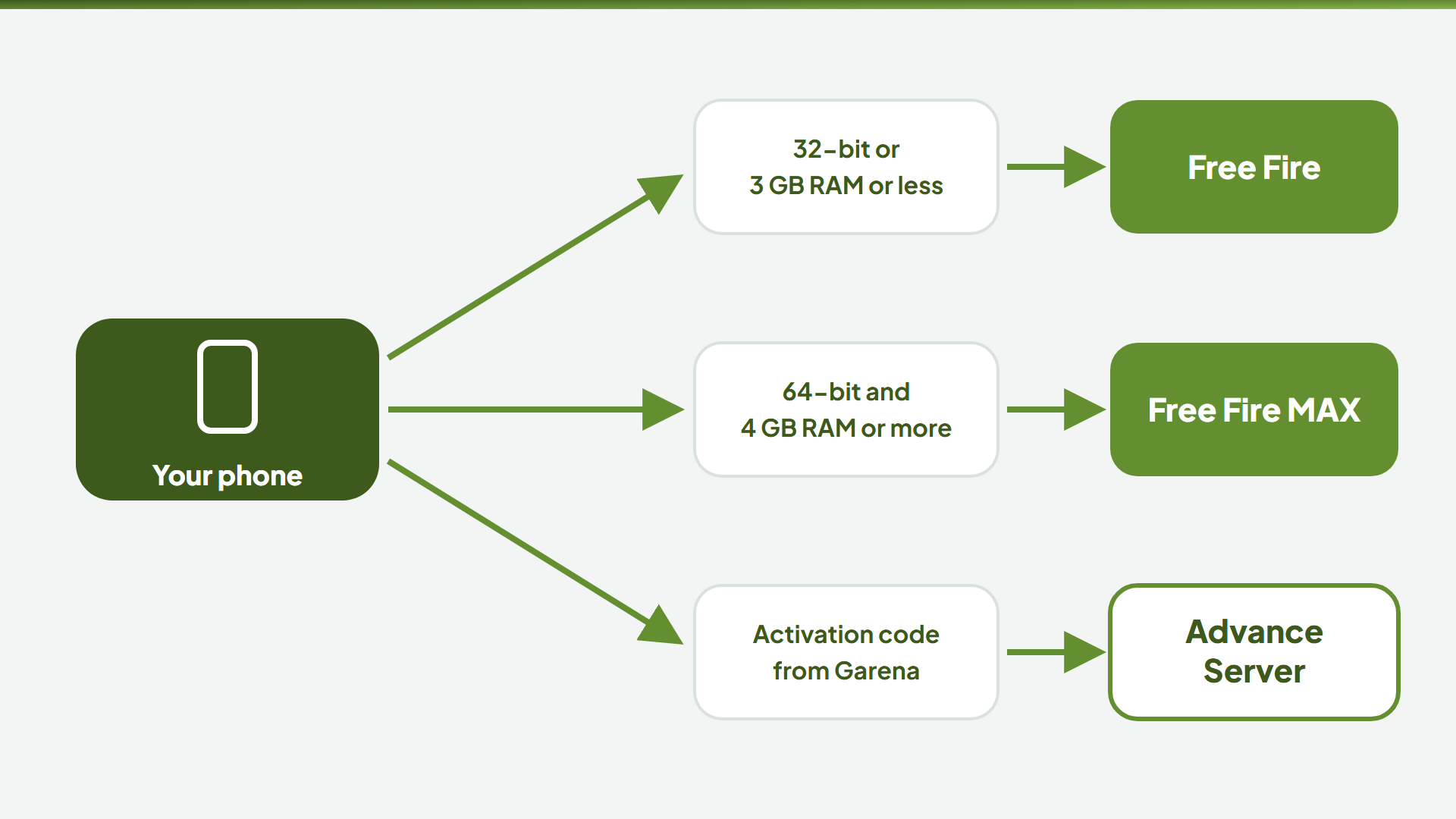
- Choose Free Fire if your phone is 32-bit, has 3 GB of RAM or less, or gets hot and laggy in MAX. It runs on almost any Android phone from Android 5.0.
- Choose Free Fire MAX if your phone is 64-bit with 4 GB of RAM or more and you want sharper graphics, better lighting and smoother effects.
- Not sure? Install Free Fire first. Because the account is shared, you can switch to MAX later without losing anything.
Free Fire on 32-bit phones
Many searches for a “Free Fire 32-bit APK” come from players whose phone shows “app not compatible” for Free Fire MAX. The reason is simple: Free Fire MAX contains only 64-bit code, so it cannot install on a 32-bit phone at all. The original Free Fire still includes 32-bit code, so it is the version for these phones. There is no separate 32-bit edition to look for.
To check your phone, install a system information app or look in Settings › About phone for the processor details. If it says armeabi-v7a only, or “32-bit”, your phone is 32-bit. Some phones have a 64-bit processor but run a 32-bit version of Android; for apps, they count as 32-bit.
What is the Free Fire Advance Server?
Before each big update, Garena opens a test server where selected players try new characters, weapons and modes early and report bugs. It uses its own app and is open only for a short window each time.
- Register on the official siteWhen registration is open, sign in on Garena’s Advance Server website with the account linked to your Free Fire profile and fill in the form.
- Wait for an activation codePlaces are limited. If you are selected, the code appears on the Advance Server website. Without a code, the app opens but you cannot play.
- Install the Advance Server appIt installs next to Free Fire and does not replace it. The download is large, so use Wi-Fi.
- Test and report bugsUse the in-game report option. Garena has rewarded players for valid bug reports in past test cycles.
Progress on the Advance Server does not carry over to your main account, and the test server closes when the update goes live. Nobody can sell or give you an activation code except Garena; sites that promise codes are scams.
Free Fire Advance ServerAction · 902.61 MB · 68.54.0 · APK Download
Brazil server and other regions
All regions use the same Free Fire app. There is no separate “Brazil server APK”. Your server region is set by Garena when your account is created, based on where you are. Files that claim to move you to another server are modified builds, and using them, or tricks that hide your location, can get your account banned.
The region of an existing account normally cannot be changed by the player. If you move to another country, contact Garena’s support through the game rather than using third-party tools.
Can you play an older version of Free Fire?
No. Free Fire is an online game, and after each update the servers accept only the newest version. An older version opens, then asks you to update before you can play. Old versions are useful only to reinstall quickly and then update inside the game.
If an update fails or the game will not install, our guide to install errors explains each message. Free Fire downloads as an XAPK on APKCombo; this guide shows how to install it.
Hacks, diamond generators and other traps
Searches around Free Fire are full of “hack”, “aimbot”, “auto headshot” and “free diamonds” apps. None of them are safe:
- Hacks and aimbots are detected by Garena’s anti-cheat, and accounts using them are banned, often permanently.
- Diamond generators cannot add diamonds to your account; diamonds are stored on Garena’s servers. These sites collect your login or make you complete surveys.
- “Config files” and “sensitivity files” that ask you to replace game data can break the game or carry malware.
Diamonds come only from top-ups through the game or Garena’s official top-up pages, and from in-game events.
Install Free Fire on 32-bit or low-memory phones, and Free Fire MAX on 64-bit phones with 4 GB of RAM or more; your account works in both. The Advance Server is a test version that needs Garena’s activation code, and there is no separate Brazil, 32-bit MAX or old-version build that can play online.
Frequently asked questions
Is there a 32-bit version of Free Fire MAX?
No. Free Fire MAX supports only 64-bit phones. On a 32-bit phone, install the original Free Fire, which uses the same account.
Do Free Fire and Free Fire MAX share the same account?
Yes. Through Firelink, your progress, skins and diamonds are the same in both, and players on both versions play together.
How do I get a Free Fire Advance Server activation code?
Register on Garena’s official Advance Server website while registration is open. Selected players see their code there. Codes are never sold.
Can I download a Brazil server version of Free Fire?
No. Every region uses the same app, and your server is set when your account is created. Modified “server” files can get your account banned.
Why does an old version of Free Fire ask me to update?
Free Fire is online-only, and the servers accept only the latest version. Update the game to keep playing.
Reviews and ratings
Your comment was submitted and is awaiting moderation.
Your comment was published.