




WIFI Analyzer APP
A WIFI Analyzer app (open source) helps you optimize your wireless network by providing real-time insights into signal strength, channel usage, and network performance.
It identifies weak spots, suggests the best channels, and ensures a smoother, faster connection. Perfect for troubleshooting and enhancing wifi coverage.
With real-time signal strength measurements, channel usage analysis, and interference detection, the app provides valuable insights into your network's health.
It offers a comprehensive suite of features designed to analyze and optimize your wifi connection.
No signup and login authentication required.
Key features:
Signal Strength Analysis: Measure your wifi signal strength in real time to identify weak spots in your home or office and ensure uninterrupted connectivity in every corner.
Channel Optimization: Discover the least crowded channels to minimize interference and boost your network speed. Perfect for environments with overlapping networks.
Network Visualization: Utilize heatmaps and signal graphs to see your network coverage and plan better router placements for maximum efficiency.
Interference Detection: Identify devices and networks that might be interfering with your connection and get recommendations for reducing conflicts.
Device Management: View all connected devices on your network, monitor bandwidth usage, and detect unauthorized access instantly.
Empower your network management with the wifi Analyzer app and enjoy faster speeds, improved coverage, and a more stable connection every day.
Access Points: View nearby networks with SSID, BSSID, signal strength (dBm), frequency, channel, width, and Wi‑Fi standard.
Channel Graph: Visualize channel usage and overlap across 2.4 GHz, 5 GHz, and 6 GHz to identify congestion.
Time Graph: Track signal strength changes over time to assess stability and roaming behavior.
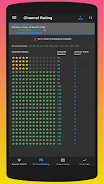
Channel Rating: Get best channel suggestions to reduce interference and improve performance.
Available Channels: See which channels are valid and supported in your region/band.
Export/Share: One‑tap export of current scan data to CSV for analysis or sharing.
6 GHz Ready
Full band support: 2.4 GHz, 5 GHz, and 6 GHz (Wi‑Fi 6E/7 where device supports it).
Smart UX: Clear message when no 6 GHz networks are detected.
Privacy:
No internet access required
The app works entirely on‑device. It does not transmit your data.
Permissions:
Nearby Wi‑Fi Devices (Android 13+) or Location (Android 6–12)
Required by the OS to perform Wi‑Fi scans. The app only uses these permissions to read Wi‑Fi scan results.
Read more
It identifies weak spots, suggests the best channels, and ensures a smoother, faster connection. Perfect for troubleshooting and enhancing wifi coverage.
With real-time signal strength measurements, channel usage analysis, and interference detection, the app provides valuable insights into your network's health.
It offers a comprehensive suite of features designed to analyze and optimize your wifi connection.
No signup and login authentication required.
Key features:
Signal Strength Analysis: Measure your wifi signal strength in real time to identify weak spots in your home or office and ensure uninterrupted connectivity in every corner.
Channel Optimization: Discover the least crowded channels to minimize interference and boost your network speed. Perfect for environments with overlapping networks.
Network Visualization: Utilize heatmaps and signal graphs to see your network coverage and plan better router placements for maximum efficiency.
Interference Detection: Identify devices and networks that might be interfering with your connection and get recommendations for reducing conflicts.
Device Management: View all connected devices on your network, monitor bandwidth usage, and detect unauthorized access instantly.
Empower your network management with the wifi Analyzer app and enjoy faster speeds, improved coverage, and a more stable connection every day.
Access Points: View nearby networks with SSID, BSSID, signal strength (dBm), frequency, channel, width, and Wi‑Fi standard.
Channel Graph: Visualize channel usage and overlap across 2.4 GHz, 5 GHz, and 6 GHz to identify congestion.
Time Graph: Track signal strength changes over time to assess stability and roaming behavior.
Channel Rating: Get best channel suggestions to reduce interference and improve performance.
Available Channels: See which channels are valid and supported in your region/band.
Export/Share: One‑tap export of current scan data to CSV for analysis or sharing.
6 GHz Ready
Full band support: 2.4 GHz, 5 GHz, and 6 GHz (Wi‑Fi 6E/7 where device supports it).
Smart UX: Clear message when no 6 GHz networks are detected.
Privacy:
No internet access required
The app works entirely on‑device. It does not transmit your data.
Permissions:
Nearby Wi‑Fi Devices (Android 13+) or Location (Android 6–12)
Required by the OS to perform Wi‑Fi scans. The app only uses these permissions to read Wi‑Fi scan results.
 inshot
  deviantart
  1111 vpn
  x vpn
x vpn  fitatu
  ทาง รัฐ
  michat
  ais play
  photoshop
  telebox
  online calculator
  cpu z
cpu z  space
space  talkatone
  soy rappi
  g camera
  免費 電視 第 四 台 看 到 飽
  野球 速報
野球 速報  lensa
lensa  sonyliv


