Is there an App Store for Android?
No. The App Store is Apple’s own store, and it exists only on iPhone, iPad, Mac and Apple’s other devices. Apple has never made an Android version, so there is no real App Store APK.
Even if there were, it would not help. iPhone apps are built for iOS and come as .ipa files, which Android cannot open or run. Every app that calls itself “App Store” on Android is something else, and this guide explains what those apps are and what to install instead.
What “App Store APK” files really are
| Type | What it does | Worth installing? |
|---|---|---|
| iOS-style catalog | Lists Android apps in a layout that looks like Apple’s store | Only if you like the look. It installs nothing that Google Play cannot |
| iPhone launcher or theme | Makes your home screen look like iOS | Harmless if it comes from a known developer |
| “iOS emulator” | Claims to run iPhone apps on Android | No. No such emulator exists for phones; these show ads or worse |
| Fake installer | Asks you to complete surveys, pay, or turn on accessibility access | No. Uninstall it |
The most downloaded app of the first kind on APKCombo is the one below. It is made by an independent developer, not by Apple, and it browses Android apps with an iOS-style design.
App StoreProductivity · 22.35 MB · 1.0.17 · XAPK Download
Why iPhone apps cannot run on Android
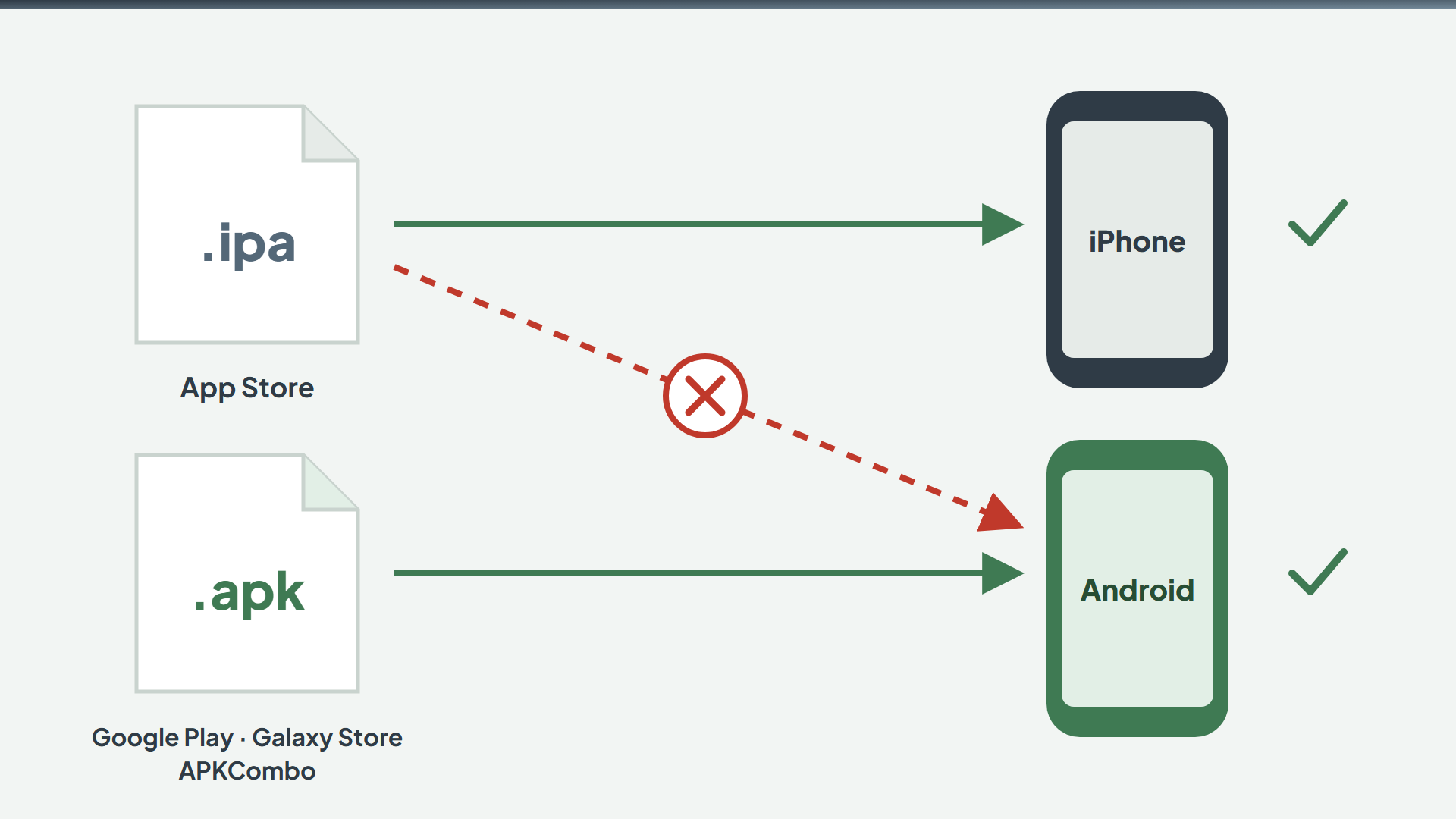
An iPhone app is compiled for iOS and calls Apple’s own system libraries for the screen, sound, notifications and payments. Android has different libraries and a different app format. That is why developers who want to reach both platforms build two separate apps, one for each store.
The good news is that almost every popular iPhone app already has an Android version on Google Play: WhatsApp, Instagram, TikTok, CapCut, Spotify, Netflix, banking apps and nearly all big games.
What to install instead
- The same apps: search for them on Google Play or on APKCombo. If an app is missing in your country’s Play Store, our guide to APK download sites explains where to find it safely.
- Another store: Samsung phones come with Galaxy Store, and Huawei phones with AppGallery. Both offer Android apps only.
- The iPhone look: an iOS-style launcher changes the home screen, and on many phones you can change the system font from the settings or the theme store.

Apple apps that do exist for Android
Apple publishes a handful of its own apps for Android. They are real Apple apps and sign in with an Apple Account, but none of them can install iPhone apps.
| App | What it is for |
|---|---|
| Apple Music | Apple’s music streaming service, with your iCloud music library |
| Apple TV | Apple TV+ shows and films, on Android TV and Google TV |
| Move to iOS | Copies contacts, messages, photos and more from an Android phone to a new iPhone |
Moving the other way, from an iPhone to Android, is built into Android’s setup: connect the two phones with a cable or sign in with your Google Account during setup. Our guide to moving apps to a new phone covers the details.
There is no App Store for Android, and no app can run iPhone apps on an Android phone. Files named “App Store APK” are catalogs, launchers or fakes. Get the Android versions of your apps from Google Play, Galaxy Store or APKCombo, and if an app comes as an XAPK, follow our XAPK install guide.
Frequently asked questions
Can I download the Apple App Store on Android?
No. Apple makes the App Store only for its own devices. Apps called “App Store” on Android are made by other developers and cannot install iPhone apps.
Can Android run iPhone apps?
No. iPhone apps are built for iOS as IPA files, and Android cannot open or run them. Apps that claim to emulate iOS on a phone do not work.
Is the “App Store” APK safe?
The catalog app on APKCombo is a normal Android app with an iOS-style design. Avoid any “App Store” app that asks for accessibility access, admin rights, payment details or surveys.
Which Apple apps are on Android?
Apple Music, Apple TV (on Android TV and Google TV) and Move to iOS are the main ones. They are published by Apple on Google Play.
How do I make my Android phone look like an iPhone?
Install an iOS-style launcher for the home screen, and change the system font and icons from your phone’s settings or theme store. The apps themselves stay Android apps.
Reviews and ratings
Your comment was submitted and is awaiting moderation.
Your comment was published.