App Screenshots


Chromium browser with desktop extension support
Chromium-based mobile web browsing often leaves out desktop-level customization, but Kiwi Browser bridges that gap by enabling support for full desktop extensions. This allows users to integrate laptop-style tools like password managers, note takers, and content blockers directly into their mobile workflow. Alongside flexible extensions, it includes deep privacy controls to disable AMP pages and tracker scripts, built-in pop-up suppression, customizable contrast settings for dark themes, and layout adjustments like a bottom-placed address bar.
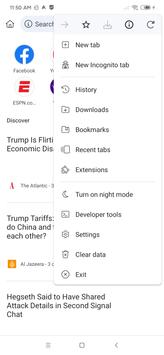
The primary capability of the app is its ability to load standard desktop extensions. By importing tools typically reserved for desktop environments, you can maintain a consistent setup across devices. For instance, running your preferred password manager or a dedicated note-taking extension directly inside the mobile browser removes the need to switch between separate third-party applications while reading or working online.
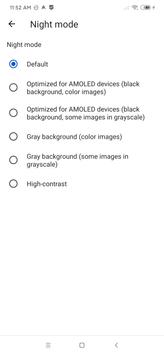
Adjustments to the interface help tailor the reading experience to your physical grip and environment. You can move the address bar to the bottom of the screen for easier one-handed navigation and edit the homepage tiles to keep frequent destinations accessible. For viewing in low-light conditions, Night Mode provides control over contrast and grayscale levels, which helps reduce visual strain and suits AMOLED displays when navigating long articles or media sites.
Integrated privacy tools minimize common web distractions and background overhead. The app automatically blocks unwanted pop-ups, silences intrusive site notifications, and bypasses Google AMP links to load direct web pages. Combined with tracker blocking, these controls help pages load cleanly and maintain steady performance on media-heavy sites without requiring extensive manual configuration.
Moving your existing data into the app is handled through built-in import and export tools for bookmarks. When accessing foreign-language sites, an integrated translation feature supports over sixty languages to render text readable without leaving the current tab. Additionally, you can specify a custom downloads folder to organize saved files according to your local file structure.
Because the underlying project has been archived, future security patches and updates may stop. Readers evaluating the app should weigh its desktop extension compatibility and interface options against the potential lack of long-term maintenance.
Your comment was submitted and is awaiting moderation.
Your comment was published.