App Screenshots

Digital film camera controls and cloud sync
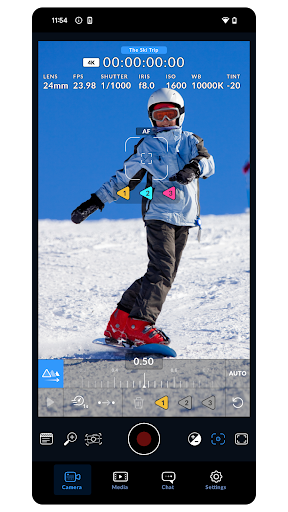
Blackmagic Camera transforms a mobile device into a digital film camera by giving videographers direct, manual control over essential capture settings and live monitoring tools. Designed for high-end mobile shoots, it features a touch-driven heads-up display to adjust parameters on the fly, alongside advanced exposure aids like false color and focus peaking. Its standout capability is background proxy uploading directly to Blackmagic Cloud, allowing editors working in DaVinci Resolve to access media and start cutting project bins instantly while production continues on set.
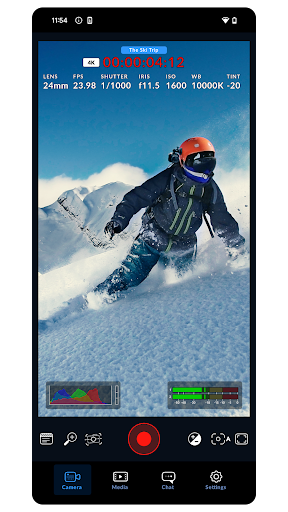
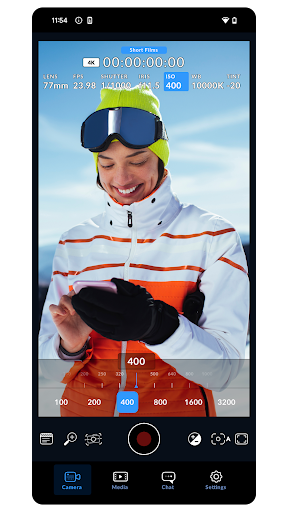
The main interface places core video parameters directly on the screen, letting users tap values to change frame rate, shutter angle, ISO, white balance, tint, and audio levels without leaving the preview view. It supports shooting resolutions up to 8K on compatible hardware, with flexible switching between 16:9 widescreen and vertical aspect ratios. To preserve natural motion cadence, users can lock a standard 180-degree shutter, or lock white balance to maintain consistent color temperature across a scene. Focus pullers can make smooth manual pulls or tap to select focus points, supported by peaking overlays, false color, zebra patterns, and histograms to evaluate exposure accuracy across the entire frame.
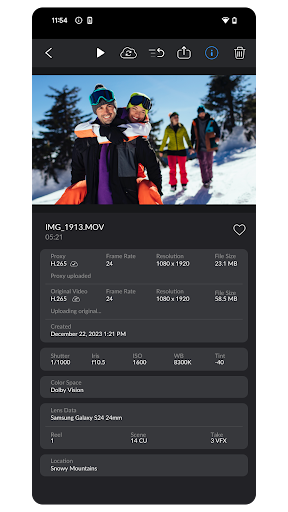
For fast-turnaround productions, the software bypasses physical media offloading by uploading proxy clips to Blackmagic Cloud over cellular or Wi-Fi networks as recording happens. The Media tab allows creators to link their device library and manage background transfers, automatically queuing media if the network connection drops out so files send as soon as signal restores. These proxies automatically sync directly into project bins inside DaVinci Resolve, enabling off-site editors to begin assembly, color grading, or rough cuts while camera operators are still shooting additional takes.
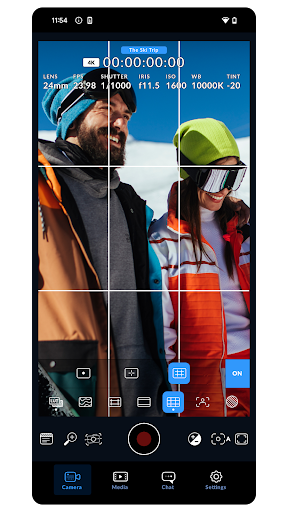
The application streamlines multi-camera setups through built-in sync and control features over a shared local Wi-Fi network. Operators can manage remote multicam setups from one unit, using a single tap to start or stop recording across all connected mobile units simultaneously. To keep multi-angle shoots organized during post-production, Bluetooth timecode synchronization allows multiple devices to share aligned timecode metadata, ensuring every clip aligns precisely on an editing timeline. Filmmakers can also import and preview 3D LUTs for on-set color grading visualizers, and toggle frame and safe guides to compose shots for specific delivery formats.
Your comment was submitted and is awaiting moderation.
Your comment was published.