What happened to Citra
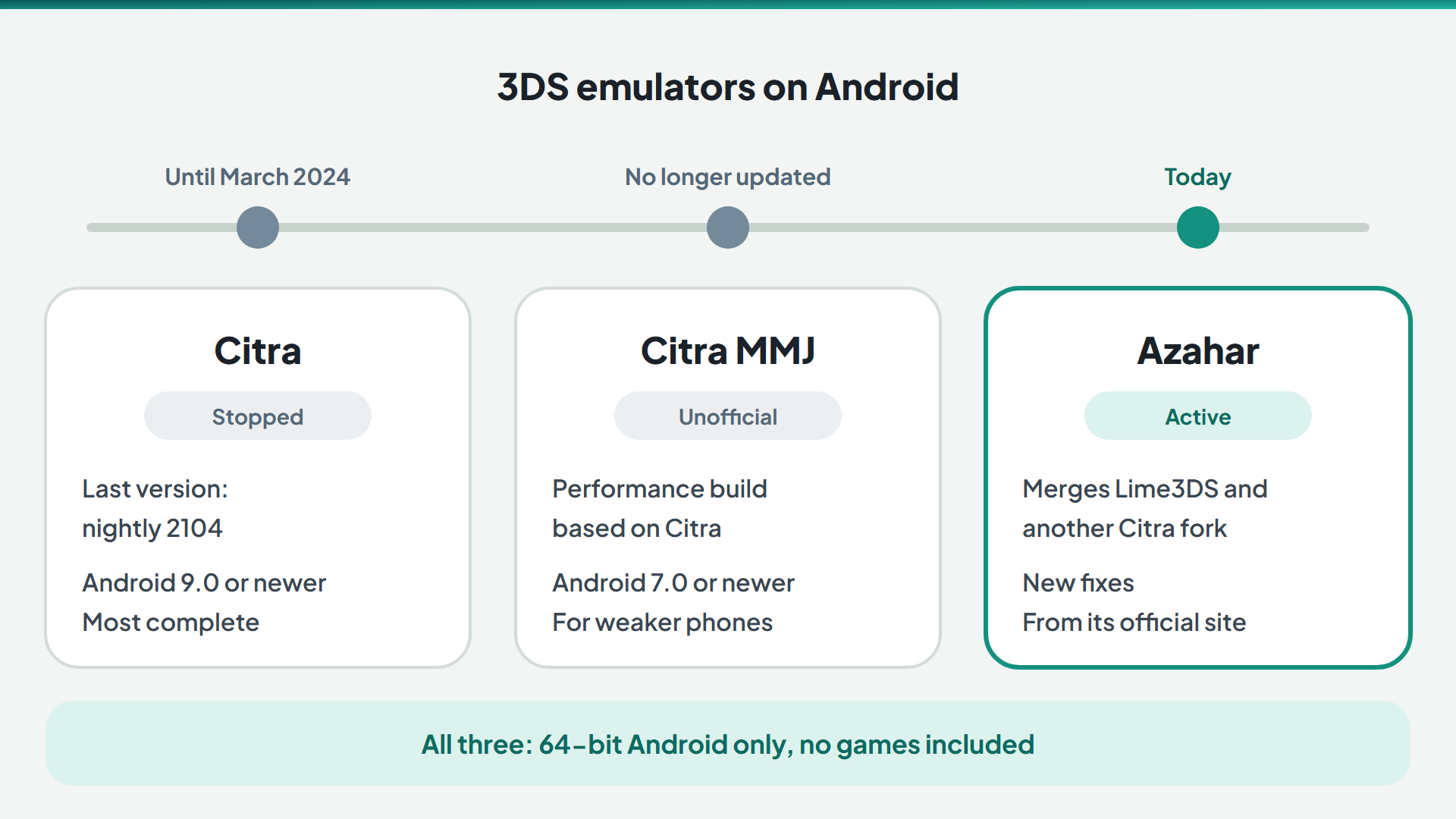
For years Citra was the most used Nintendo 3DS emulator on PC and Android. In March 2024 its development stopped and the official downloads were removed, after the settlement between Nintendo and the makers of the Switch emulator Yuzu, who shared team members. Since then several versions have been around: the last official Citra, Citra MMJ, and new projects that continue its code, such as Azahar.
This guide explains which one to use in 2026, what your phone needs, and how to avoid fake apps that use Citra’s name. None of these emulators include games: you need copies of cartridges you own.
Citra, Citra MMJ and Azahar
| Citra (official) | Citra MMJ | Azahar | |
|---|---|---|---|
| Status | Stopped in March 2024 (last build: nightly 2104) | Unofficial build, no longer updated | Active, continues Citra’s code |
| Android on APKCombo | Android 9.0 or newer | Android 7.0 or newer | Android 10.0 or newer |
| Architecture | arm64-v8a only | arm64-v8a only | 64-bit only |
| Best for | Recent phones with Vulkan; the most complete Citra | Weaker or older phones where Citra runs slowly | Anyone who wants new fixes and improvements |



All three need 64-bit Android. If your phone runs 32-bit Android, they will not install; our guide to 32-bit and 64-bit Android shows how to check.
What your phone needs
- A mid-range chip or better. Many 3DS games run at full speed on phones from the last few years; the most demanding ones, such as some 3D Pokémon games, need a powerful chip.
- An Adreno GPU (Snapdragon) if possible. Mali works too, but with more graphics glitches.
- 3 GB of RAM or more and space for your games, which range from 100 MB to several gigabytes.
Recommended settings
- Choose the user folder when you first open the emulator. Saves, settings and installed titles are kept there.
- Add your games from the folder with your copies (.3ds, .cci, or an installed .cia). The files must be decrypted.
- Use Vulkan in Settings › Graphics if your phone supports it; it is usually faster than OpenGL. In Citra MMJ, also try OpenGL if you see glitches.
- Internal resolution 1x or 2x. Raise it only if the game holds full speed.
- Turn on the disk shader cache so the stutter of the first session does not come back later.
Watch out for fake “Citra” apps
Stores and websites show apps named like “Pokémon … version” or “3DS emulator pro” that claim to include Citra or a ready-to-play game. They are not from the Citra team: they are usually ad-filled apps, modified builds or misleading downloads. Warning signs:
- The app is named after a single game, not an emulator.
- It promises included games or “all ROMs free”.
- It asks for permissions an emulator does not need, such as contacts or SMS.
Common problems
| Problem | Fix |
|---|---|
| “App not installed” | Your phone runs 32-bit Android, or Citra needs Android 9. Try Citra MMJ on Android 7 or 8. |
| Game does not appear or start | The file must be decrypted. Encrypted files do not work in any version. |
| Game is slow | Use Vulkan, lower resolution to 1x, turn off battery saver and try Citra MMJ for that game. |
| Stutter at the start | That is shader building; turn on the disk cache and it improves over time. |
For other consoles, see our guides to the GameCube and Wii emulator and the Switch emulator on Android.
In 2026, official Citra (last build nightly 2104) and Citra MMJ still run on 64-bit Android, but they are no longer updated. Azahar is the project that continues Citra’s code. Use Vulkan, 1x or 2x resolution and the shader cache, avoid apps named after a game that claim to include Citra, and play only copies of your own cartridges.
Frequently asked questions
Does Citra still work in 2026?
Yes. The last official build and Citra MMJ still work, though they have not been updated since development stopped in March 2024.
Which is better, Citra or Citra MMJ?
On recent phones, official Citra with Vulkan is usually more accurate. Citra MMJ can be faster on weaker phones and runs on Android 7.
What is Azahar?
It is the project that continues Citra’s code, formed by merging Lime3DS with another Citra continuation. It gets new fixes and improvements.
Is there Citra for 32-bit Android?
No. Citra, Citra MMJ and Azahar need 64-bit Android.
Is it legal to use a 3DS emulator?
Using the emulator is legal. Downloading games you do not own is not; dump your own cartridges.
Reviews and ratings
Your comment was submitted and is awaiting moderation.
Your comment was published.