GameCube and Wii games on Android
Dolphin is the emulator that runs GameCube and Wii games on Android. Besides the official app there are two popular unofficial builds, Dolphin MMJR2 and Ishiiruka, which change settings and code to run faster on some phones. This guide compares the three, lists what your phone needs, and shows the settings that fix most slowdowns.
None of these apps include games. You need copies of discs you own, which you can make with a Wii and a disc-dumping tool such as CleanRip.
Dolphin vs MMJR2 vs Ishiiruka
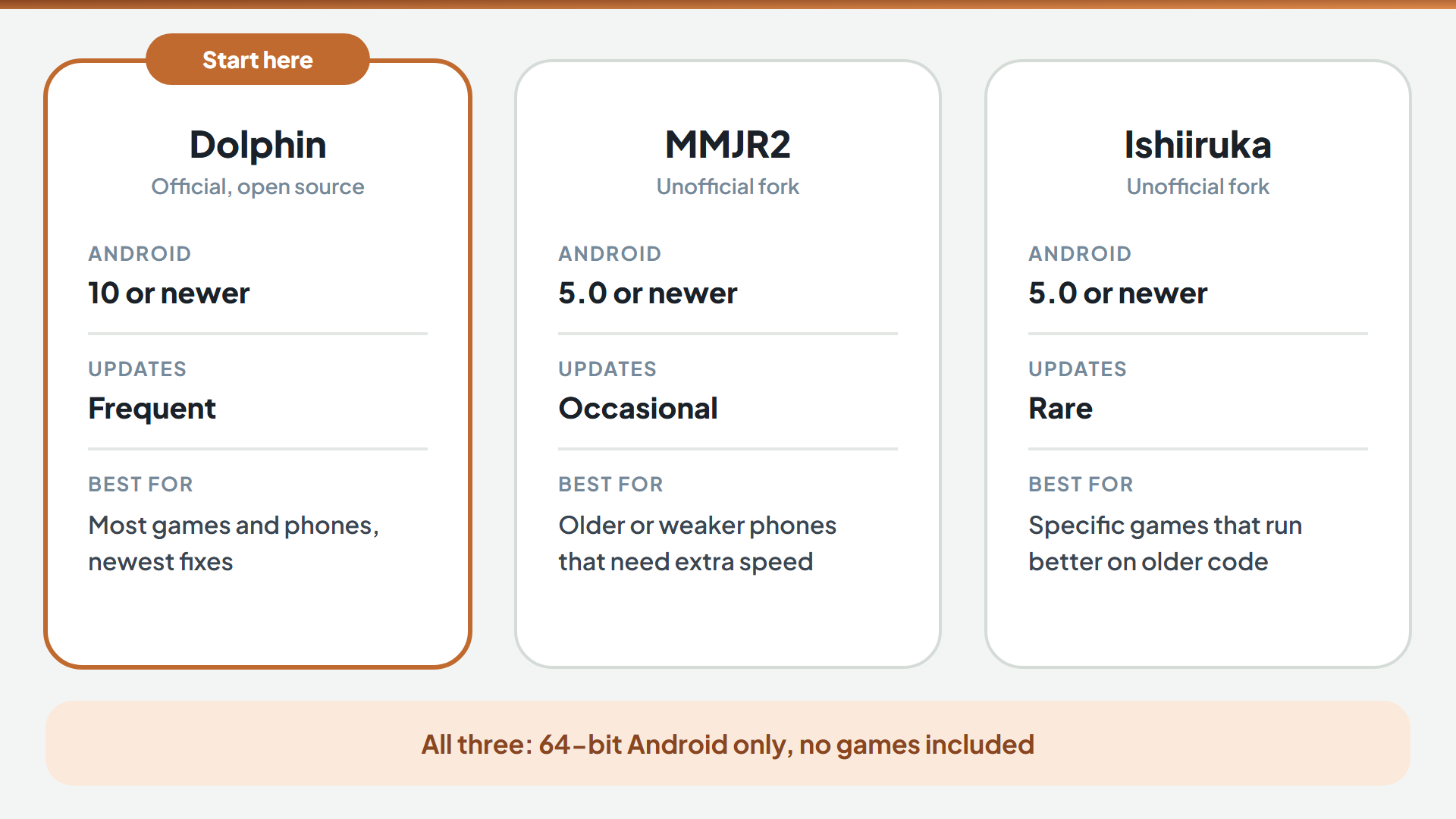
| Dolphin (official) | Dolphin MMJR2 | Ishiiruka | |
|---|---|---|---|
| Made by | The Dolphin team (open source) | Community fork of Dolphin | Community fork of Dolphin |
| Android version | Android 10 or newer | Android 5.0 or newer | Android 5.0 or newer |
| Architecture | arm64-v8a only | arm64-v8a only | arm64-v8a only |
| Updates | Frequent | Occasional | Rare |
| Best for | Most games and phones; Wii and GameCube features, Vulkan, newest fixes | Older or weaker phones that need extra speed | Specific games that run better on its older code |
All three are 64-bit only. If your phone runs 32-bit Android, none of them will install; our guide to 32-bit and 64-bit Android shows how to check.
Dolphin EmulatorArcade · 15.12 MB · 2609b · XAPK Download Dolphin MMJR2Tools · 12.4 MB · U24.03.22-21259 · APK Download IshiirukaTools · 6.42 MB · v6 · APK Download

What your phone needs
- A recent mid-range or better chip. GameCube games are playable on most phones from the last few years. Wii games are heavier.
- Snapdragon (Adreno GPU) works best. Phones with Mali or PowerVR graphics run Dolphin too, but more games show glitches or run slower. On Adreno phones, newer Dolphin builds can also load custom GPU drivers.
- 4 GB of RAM or more and a few gigabytes of free storage for each game.
- Good cooling. Phones slow down when hot, so long sessions can drop frames even on a fast chip.
Setting up Dolphin
- Install Dolphin and open it. Allow access to the folder where you keep your game files.
- Add your games. Tap the plus button and choose the folder with your .iso, .rvz or .wbfs files. RVZ is a compressed format that saves space without losing anything.
- Choose the graphics backend. Go to Settings › Graphics and try Vulkan first. If a game shows glitches, switch to OpenGL for that game.
- Fix stutter. Under Settings › Graphics › Advanced, set Shader Compilation to Asynchronous (Ubershaders) or Asynchronous (Skip Drawing). The first few minutes may still stutter while shaders are built.
- Keep resolution at 1x (native) at first. Raise it to 2x only if the game holds full speed.
Controllers and Wii Remote controls
- Touch controls are on by default. You can move and resize the buttons in the in-game menu.
- Bluetooth gamepads such as Xbox, PlayStation or generic Android controllers work well. Map them in Settings › GameCube Input or Wii Input.
- Wii motion controls can use the phone’s gyroscope to point, or be mapped to an analog stick. Real Wii Remotes are hard to connect on Android, so most players use a gamepad instead.
Common problems
| Problem | Fix |
|---|---|
| “App not installed” | Your phone runs 32-bit Android, or official Dolphin needs Android 10. Try MMJR2 on Android 5–9. |
| Game is slow | Use Vulkan, keep resolution at 1x, turn off battery saver and let the phone cool down. Try MMJR2 for that game. |
| Black screen or missing graphics | Switch between Vulkan and OpenGL, and reset the game’s own settings. |
| Short freezes when new effects appear | Use asynchronous shader compilation; it gets better as shaders are cached. |
| Game not in the list | Check the folder permission and that the file is .iso, .rvz, .gcz or .wbfs, not a .zip. |
For other consoles, see our guides to the PS2 emulator and the Switch emulator on Android.
Use official Dolphin on Android 10 or newer for the best compatibility and updates. Dolphin MMJR2 and Ishiiruka are unofficial forks that can be faster on some phones and still run on Android 5. All three need 64-bit Android, work best on Snapdragon phones, and need game files you dumped from your own discs.
Frequently asked questions
Is there a 32-bit version of Dolphin for Android?
No current one. Dolphin, MMJR2 and Ishiiruka are all 64-bit only. Very old 32-bit builds exist but are slow and no longer supported.
Which is faster, Dolphin or MMJR2?
It depends on the phone and the game. On recent Snapdragon phones official Dolphin is usually as fast and more accurate. MMJR2 can help on older or weaker phones.
Is Ishiiruka the same as Dolphin?
It is an unofficial fork of Dolphin based on older code. It is fast in some games but gets few updates and lacks newer fixes.
Do these emulators come with games?
No. You need game files made from discs you own. Downloading games you do not own is piracy.
Can I play Wii games without a Wii Remote?
Yes. Map the Wii Remote to touch controls or a gamepad, and use the phone’s gyroscope for pointing if the game needs it.
Reviews and ratings
Your comment was submitted and is awaiting moderation.
Your comment was published.