Can you play Switch games on Android?
Yes, on a fast enough phone. Nintendo has never released Switch games for Android, but open-source emulators can run many of them. The catch is that the scene keeps changing: the two best-known names, Yuzu and Skyline, have both been shut down, and most search results still point to them.
In 2026 the emulator most players use on Android is Eden, a continuation of Yuzu’s code. This guide explains what happened to each emulator, what your phone needs, and how to set Eden up without breaking any rules.
Eden EmulatorSimulation · 46.49 MB · 6045627462 · APK Download
Which Switch emulators still work
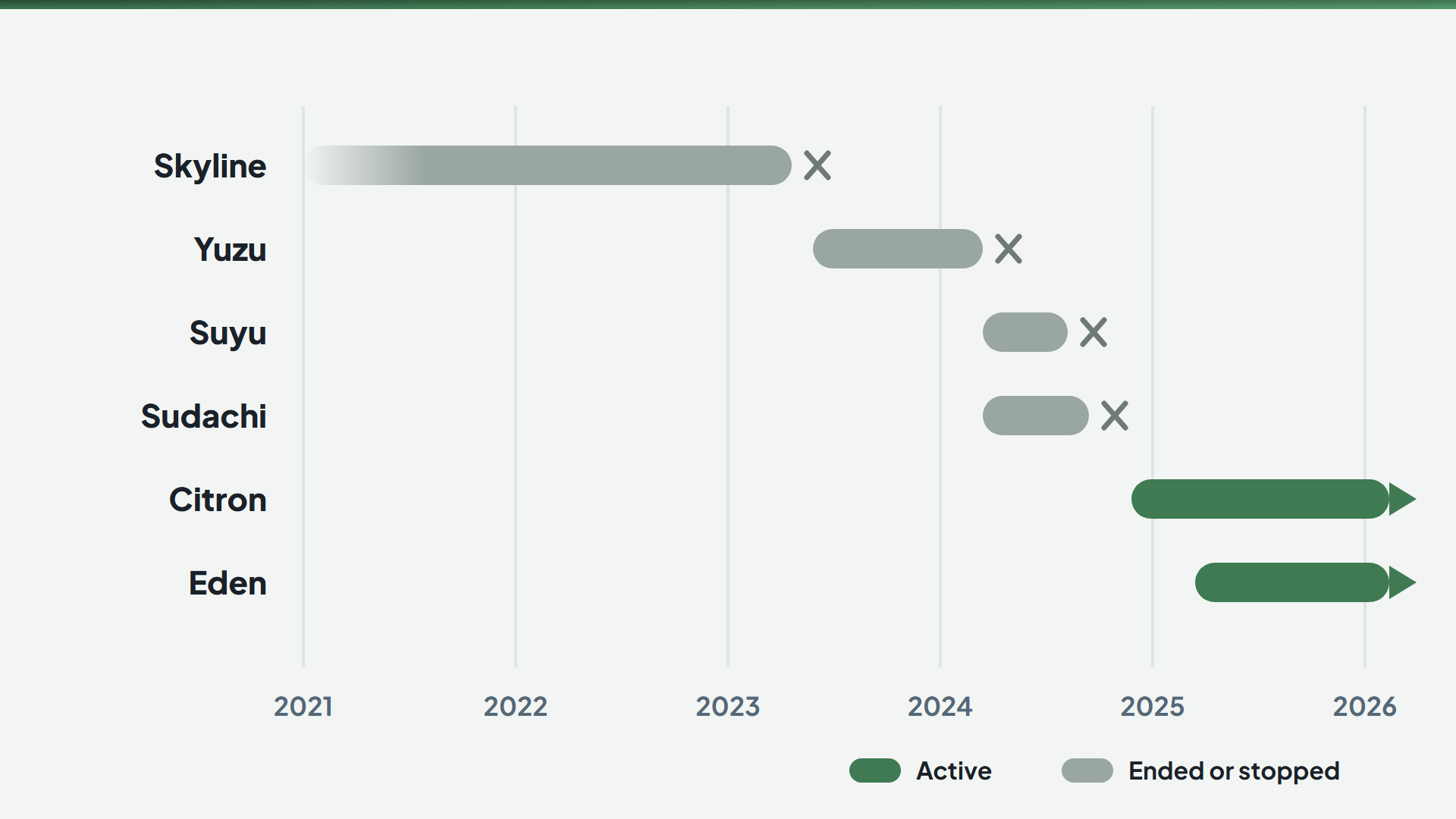
| Emulator | Status | What to know |
|---|---|---|
| Eden | Active | The most used option on Android. Needs Android 11 or later |
| Citron | Active, with pauses | Also based on Yuzu. Development has stopped and restarted more than once |
| Yuzu | Ended in March 2024 | Shut down after Nintendo sued its developers. The last build still runs but gets no fixes |
| Suyu | Stopped | A Yuzu fork that lost its hosting in 2024 |
| Sudachi | Stopped | A Yuzu fork whose development ended soon after it started |
| Skyline | Ended in 2023 | The first Switch emulator for Android. Its developers stopped for legal reasons |
| Egg NS | Abandoned | Closed source and tied to one brand of controller. Avoid it |
What happened to Yuzu?
Yuzu was the most popular Switch emulator on PC and later on Android. In March 2024 Nintendo sued its developers, who settled for 2.4 million US dollars and took the project down. Nintendo has continued to send takedown notices to other Switch emulator projects since then.
The last Yuzu build for Android still installs and runs, but it will never get bug fixes or support for newer games. That is why most players moved to Eden. If you already use Yuzu and it works for your games, there is no need to switch right away.
yuzu EmulatorTools · 34.14 MB · d590cfb9d · APK Download
What your phone needs
| Minimum | Recommended | |
|---|---|---|
| Android | 11 | 13 or later |
| Processor | Snapdragon 865 or similar | Snapdragon 8 Gen 2 or newer |
| Graphics | Adreno 650 | Adreno 740 or newer |
| RAM | 6 GB | 12 GB |
| Free storage | 10 GB | 64 GB or more for several games |
Phones with Snapdragon chips and Adreno graphics run Switch emulators best, because they support the custom graphics drivers the emulators rely on. Phones with Mali or PowerVR graphics (many Exynos, MediaTek and Tensor chips) can run lighter games, but expect more glitches and lower speed.
How to set up Eden
- Install EdenDownload Eden from its page on APKCombo and install it. If Android blocks the file, allow installs from your browser or use APKCombo Installer.
- Add your keysOn first launch Eden asks for a
prod.keysfile. These are decryption keys that you dump from your own Switch with a homebrew tool. Copy the file to your phone and select it. - Add the firmwareEden also asks for the Switch system firmware. Dump it from your own console too, then install it from Eden’s settings.
- Choose a games folderPick the folder where you keep your game files (NSP or XCI). Eden scans it and shows your games.
- Start a game and adjustOpen a game. If it is slow, use the settings in the next section.
Best settings for speed
| Setting | Try this | Why |
|---|---|---|
| GPU driver | Install a Turnip driver (Adreno only) | Often fixes graphics bugs and adds speed on Snapdragon phones |
| Resolution scale | 0.5x or 0.75x | The biggest speed gain on mid-range phones |
| Docked mode | Off | Handheld mode renders at a lower resolution |
| ASTC decoding | GPU or asynchronous | Reduces stutter in games with large textures |
| Shader cache | On | Stutter drops after you have played a scene once |
| Phone | Plug in and use a cooler | Phones slow down when they get hot |
Games differ a lot. Lighter 2D and indie titles often run at full speed, while large 3D games may need a top phone and still have glitches. Check each emulator’s compatibility list before you dump a game.
Common problems
| Problem | Fix |
|---|---|
| “App not installed” | Eden needs Android 11 and a 64-bit phone. See what each install error means |
| Missing keys or “encryption keys are missing” | Select a prod.keys file dumped from your Switch. Keys must match the firmware version you installed |
| Game crashes on start | Update the firmware, then try another GPU driver or turn off driver features one by one |
| Black screen or wrong colours | Switch to another GPU driver. On Mali phones, try a lower resolution scale |
| Fine at first, then slow | The phone is overheating. Lower the resolution scale and let it cool |
Switch emulation on Android works, but only on recent Snapdragon phones and with keys, firmware and games from your own console. Yuzu and Skyline are gone, so install Eden, follow the settings above, and keep expectations realistic for big 3D games. For other consoles, see how to play PS2 games with NetherSX2 or run Windows games with Winlator.
Frequently asked questions
What is the best Switch emulator for Android in 2026?
Eden. It continues Yuzu’s code, gets regular updates and is the most used option on Android. Citron is the main alternative.
Is Yuzu still available for Android?
Yuzu was shut down in March 2024. Its last Android build still installs and runs, but it will not be updated.
Is it legal to use a Switch emulator?
Emulators themselves are legal in most countries. Downloading keys, firmware or games that you do not own is not. Dump them from your own Switch and cartridges.
Can my phone run Switch games?
You need at least Android 11 and ideally a Snapdragon 8 Gen 2 or newer with Adreno graphics and 8 GB of RAM or more. Older or Mali-based phones can run some lighter games.
Why does Eden ask for prod.keys?
Switch games are encrypted. The keys that decrypt them belong to Nintendo, so emulators cannot include them. You must dump them from your own console.

Reviews and ratings
Your comment was submitted and is awaiting moderation.
Your comment was published.