What the Roblox APK is
The Roblox APK is the same app Google Play installs: package com.roblox.client, published by Roblox Corporation. Installing it from an APK is useful when Google Play is missing, not working, or slow to deliver an update on your phone. Your account, friends, items and Robux live on Roblox’s servers, not in the app, so they are the same whichever way you install.

| Requirement | Roblox (global) |
|---|---|
| Android version | Android 8.0 or later |
| Processor | 64-bit and 32-bit ARM, plus x86 for emulators and Chromebooks |
| Download size | About 230 MB, plus space for game data it downloads as you play |
| Account | A free Roblox account, created in the app |
How to install or update Roblox from the APK
- Download the APKGet the latest version from the Roblox page on APKCombo. Wi-Fi is better: the app downloads more data on first launch.
- Allow the installOpen the file. If Android blocks it, tap Settings, turn on “Allow from this source” for your browser and go back.
- Install over the old versionIf Roblox is already installed, Android offers to update it. Your login stays, because the APK carries Roblox’s own signature.
- Open Roblox and sign inUse your existing account, or create one. The first start takes a moment while it loads resources.
Why old versions of Roblox do not work
Searches for an older Roblox version are common, usually because a new update runs worse on an older phone. The catch is that Roblox requires an up-to-date app to join games. Shortly after a new version rolls out, older apps show “An update is required” or fail to connect, and there is no setting to skip it.
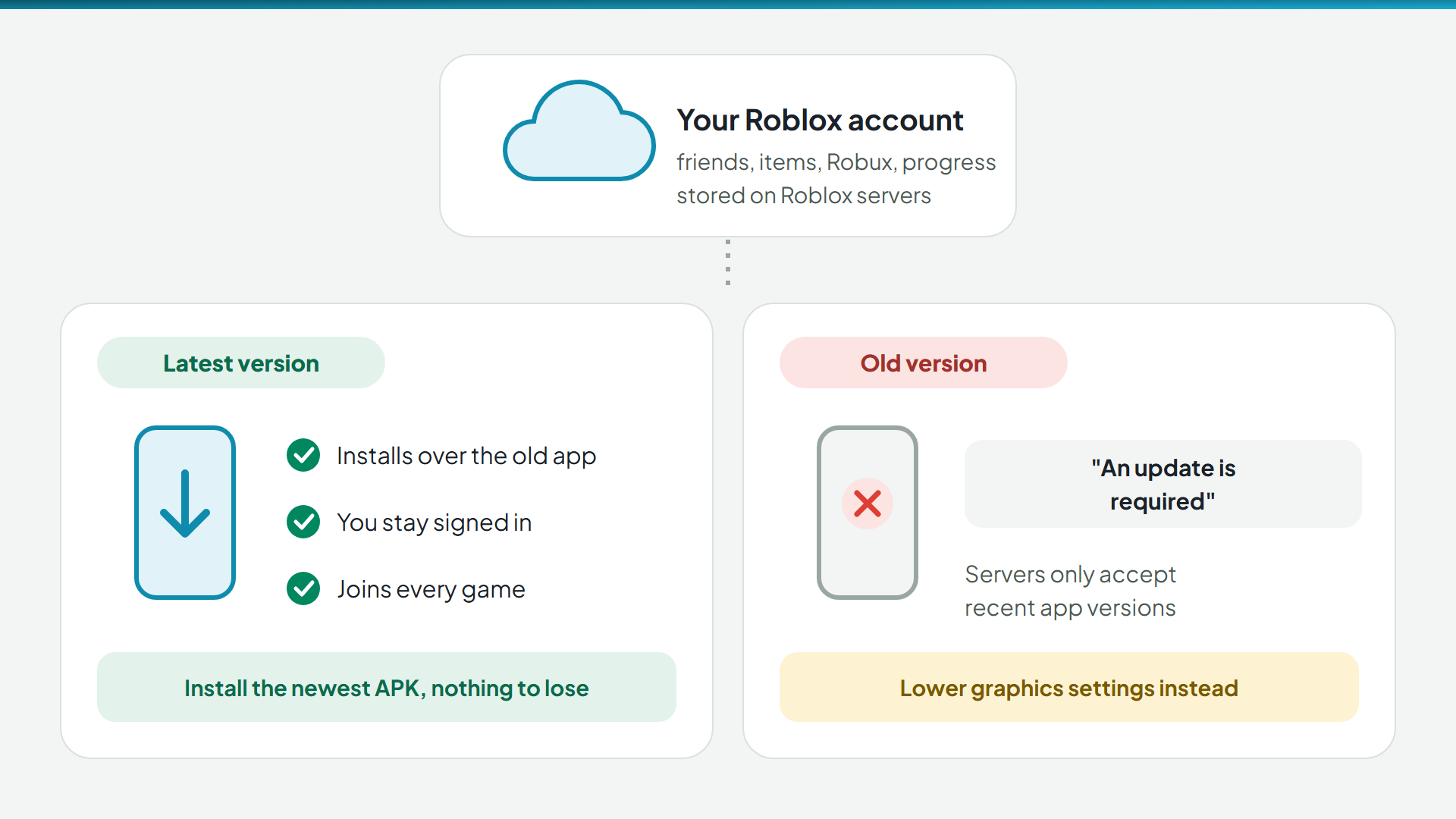
If the latest version is too heavy for your phone, these help more than an old version:
- In a game, open the menu, then Settings, and set Graphics Mode to Manual with a low graphics quality.
- Close other apps and restart the phone before playing.
- Free storage: Roblox caches data for every game you join. Clearing the app’s cache in Android settings frees it without logging you out.
Roblox (global) and Roblox VN
In Vietnam, Roblox is published by VNG as Roblox VN under local rules. It is a separate app with its own package name, so the two can be installed side by side, but they are not interchangeable.
| Roblox (global) | Roblox VN | |
|---|---|---|
| Publisher | Roblox Corporation | VNGGames |
| Package | com.roblox.client | com.roblox.client.vnggames |
| Intended for | Players outside Vietnam | Players in Vietnam |
| Local rules | Roblox’s standard rules | Vietnamese rules: playtime limits for under-18 accounts, chat limits, and only licensed experiences |
| Processor | 64-bit and 32-bit | 64-bit only |

Which app works from Vietnam has changed several times as regulations and Roblox’s regional settings changed. If one app cannot connect from your location, that is a regional decision by Roblox and VNG, not a problem with the file.
Common Roblox errors on Android
| Error | What it means | Fix |
|---|---|---|
| An update is required | Your app is older than the servers accept | Install the latest APK over the current one |
| Error 279 | Could not connect to the game server | Switch between Wi-Fi and mobile data, turn off any VPN or ad blocker, try another game |
| Error 277 | The connection dropped during play | Usually a weak connection. Move closer to the router and rejoin |
| Error 529 | Roblox itself is having problems | Wait. Nothing on your phone fixes it |
| Error 267 | Removed from the game by the game’s own rules | Check the game’s rules. Some games kick for inactivity |
| Crashes on start | Not enough memory or storage | Restart the phone, free storage, clear Roblox’s cache |
| App not installed | Android older than 8.0, or a conflicting copy | See our App not installed guide |
Free Robux and mod APKs are scams
Robux come only from Roblox: bought in the app, through Premium, or earned by selling things you create. Websites and apps that promise free Robux, “Robux generators”, modded Roblox clients and private-server apps are not connected to Roblox. They exist to collect your password, show ads, or sign you up for paid offers. Using a modified client can also get your account banned.
Install the latest Roblox APK over the old one to keep your login, keep it updated because old versions cannot join games, use the VN app only if you play in Vietnam, and ignore anything that promises free Robux.
Frequently asked questions
Is the Roblox APK on APKCombo official?
Yes. It is Roblox Corporation’s release with its original signature, the same file Google Play delivers. You can compare its SHA-256 with the one on the download page.
Will I lose my items or Robux if I install the APK?
No. Everything is stored in your Roblox account. Sign in and it is all there.
Can I play Roblox on a 32-bit phone?
The global app includes 32-bit support and runs on Android 8.0 or later. Roblox VN needs a 64-bit phone.
Can I use my global account in Roblox VN?
Roblox VN uses Roblox accounts, but it applies Vietnamese rules to them, and moving between the two apps can change what your account can access. Check VNG’s notices in the app before switching.
Why does Roblox ask me to update every week?
Roblox releases app updates very often, and the servers only accept recent versions. Updating through APKCombo Installer or Google Play keeps it current.
Reviews and ratings
Your comment was submitted and is awaiting moderation.
Your comment was published.