App Screenshots



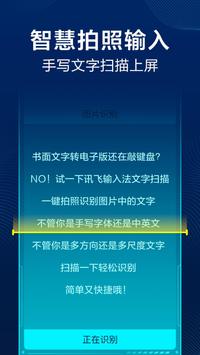


Multilingual voice and handwriting keyboard tool
1、剪贴板新增复制朗读功能,听见你的复制内容
2、优化语音智适应效果,个性化词汇越用越准
3、优化文字扫描手写体识别效果,所拍即所得
4、优化“我的”,支持用户自主选择云端同步方式
5、方言语音输入时,支持飞飞助手口令
iFly Keyboard replaces standard keyboard typing with multi-modal input options, focusing heavily on accurate voice recognition across Mandarin, English, and regional accents without requiring manual language toggles. Designed to handle rapid dictation of up to 400 words per minute, it allows users to compose text through spoken audio, handwriting, or camera scans. By combining continuous handwriting support, optical character recognition (OCR), and built-in translation tools, the app provides a versatile solution for drafting messages, transcribing text from documents, and communicating across different languages.
The primary input engine processes spoken audio instantly, converting speech to text without needing the user to switch manually between Mandarin, English, and local dialects. It supports recognition for 23 distinct Chinese dialects, ensuring accurate transcription for regional accents. For situations with limited internet access or weak network signals, an offline voice mode maintains speech recognition capabilities without relying on cloud processing.
Integrated smart OCR capabilities transform the phone’s camera into a scanning tool. By taking a picture of physical documents, printed text, or signs, the app extracts the visible characters directly into the input field. This eliminates the need to manually transcribe lengthier paper-based notes or digital text captured in images.
For manual entry, the handwriting interface supports both overlapping and continuous cursive strokes, allowing users to write multiple characters in a single fluid gesture to increase typing speed. When using traditional Pinyin, the system relies on an updated vocabulary database to deliver precise candidate word predictions, reducing keypresses during everyday typing.
The input method features built-in voice translation that instantly renders spoken Chinese into English, Japanese, Korean, or Russian. Beyond text utility, the app includes communication enhancements such as auto-suggested sticker sets, customizable blind-typing keyboard skins, specialized layouts optimized for voice chat during mobile gaming sessions, and a text-free input interface powered entirely by AI recognition.
Your comment was submitted and is awaiting moderation.
Your comment was published.