App Screenshots

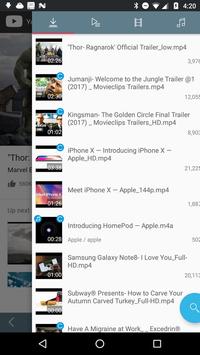




Offline video saver and audio converter
Managing video downloads requires a practical approach to file sizes, media formats, and connection limits. TubeMate is an app designed to save YouTube videos for offline viewing, offering control over file quality and format selections before a download starts. Beyond basic video saving, it allows users to extract audio directly into separate files and select specific items from playlists to download in batches, making it easier to manage media storage for travel or low-data situations.
Before initiating a download, the app displays choices for file resolution and media format. Choosing lower resolutions produces smaller files that save quickly and conserve device storage, while higher clarity options cater to larger displays. When full video is unnecessary, such as with podcasts, lectures, or music tracks, the app can convert the media directly into an audio-only file. This audio conversion saves significant storage space while retaining the sound track for listening on the go. If a chosen resolution turns out to be larger than needed, users can simply select a lower target format on their next save.
Downloading entire video playlists often results in unnecessary files taking up storage. TubeMate addresses this by allowing users to tick specific items within a playlist and download only the selected entries. For long lists or multi-part series, users can prioritize essential videos first to ensure critical files finish downloading even if a network connection drops. Setting up a batch of selected items to run overnight over Wi-Fi provides a straightforward way to build a tailored offline library without manually starting each individual save.
Completed video and audio files are stored directly in local storage and listed within the app’s offline menu, eliminating the need to search through device file directories. Having the files saved locally allows immediate playback without buffering, which is particularly useful during flights, daily commutes, or in areas with poor cellular coverage.
Standard installation relies on verified mirrors and direct links to secure the file. An experimental ad-free build is also available as an alternative option, though it comes with variable stability and update patterns compared to the standard package.
Your comment was submitted and is awaiting moderation.
Your comment was published.