App Screenshots




Manga reader with aggregated community sources
Browsing manga across multiple sources often means switching between different catalogs, but Kotatsu resolves this by aggregating content from over 1,000 community sources into a single platform. The app itself hosts no content; instead, it provides a centralized search system with detailed tag filters and a randomizer button for quick discovery. You can read online, customize the display to suit your device, or download individual chapters and full series for offline viewing. Built-in integration with tracking services also allows your reading progress to sync across accounts and devices.
Finding titles across more than 1,000 community catalogs is managed through a central search bar equipped with tag filtering. To find specific manga, you can enter a title and select specific genre or thematic tags to refine the results. When you are looking for new titles without a specific genre in mind, tapping the dice icon next to the search bar fetches a random selection from the available catalogs.
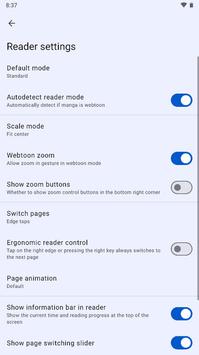
The built-in reader offers several layout and display options to adapt to different screen sizes and preferences. You can switch between vertical and horizontal reading orientations, which is useful when moving between phone and tablet displays or switching from standard page layouts to webtoons. To improve the legibility of older or lower-quality image scans, the app includes contrast adjustments and color correction options. Navigation options allow you to turn pages either by tapping the screen or by using the physical volume buttons on your device for one-handed use.
Chapters and full series can be downloaded directly to local storage by accessing the menu on any manga page. To handle catalogs that restrict heavy traffic, the downloader features an optional slow mode. Enabling this setting slows down the fetching process to prevent connection errors or catalog throttling during large downloads. Because downloading lengthy series can consume significant storage space quickly, managing save locations and chapter selections is recommended.
To keep your reading history organized, the application supports direct integration with external tracking services, including MyAnimeList, AniList, and Shikimori. Once you connect an account in the settings menu, the app automatically updates your online lists as you finish chapters. This integration also syncs your library data, ensuring your current progress and saved series remain consistent across multiple devices.
Your comment was submitted and is awaiting moderation.
Your comment was published.