App Screenshots
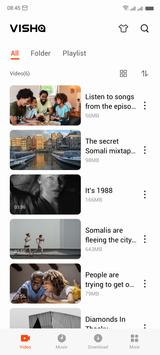

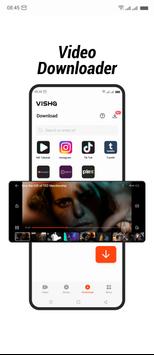

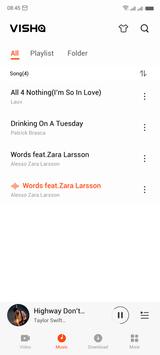

Local video and music player
1. Optimized for poor‑network conditions: improved success rate on the video download page for a better user experience.
2. Fixed playback stuttering and audio‑video desync issues; high‑definition video playback is now supported.
3. Listen to music while gaming — enjoy your tunes without compromise.
4. Added audio‑only video playback feature. Enjoy seamless video audio playback even when you’re on‑the‑go.
Visha-Video Player All Formats handles local file playback, media management, and online content streaming within a single interface. The app automatically scans internal memory and SD cards to catalog offline video and audio files, organizing them by download sources for easier navigation. Beyond standard media playback, it integrates built-in tools for downloading web media, extracting audio tracks, and hiding sensitive files behind a protected folder.
The app plays local video files and device status clips with precise controls, including variable playback speed, manual subtitle downloads, multiple audio track switching, and double-tap gestures for quick seeking. Users can continue listening to content via background playback, shrink videos into a floating window while using other applications, or set an auto-pause mode after a clip finishes. It also includes a basic video editing tool to cut clip lengths, alongside an option to convert video files directly into MP3 audio.
Audio management tools index sound tracks stored across the device. Users can filter and sort their music library, adjust sound output using an integrated audio equalizer, and set a timer to automatically shut down playback after a specified period.
For sensitive files, the app includes a dedicated Privacy Folder designed to hide selected videos from the main library view. Personalization features extend to the overall interface, offering customizable skins to adjust the app’s visual appearance.
A dedicated online section provides access to movies, TV shows, and variety shows from multiple countries, allowing users to bookmark programs. Built-in video and audio downloaders allow saving web media for offline access. The platform also offers a VIP membership tier, which grants exclusive content access, an ad-free viewing environment, and high-definition 1080P playback modes.
Your comment was submitted and is awaiting moderation.
Your comment was published.