App Screenshots


AI photo editor and portrait retouching tool
Bug fixes, experience optimization, and one-click updates.
We thank you for supporting Hypic and look forward to creating beautiful moments together.
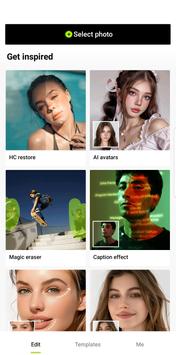
Hypic combines portrait editing, photo restoration, and creative design tools within a single space for image enhancement. The app allows users to refine casual photos into clean, stylized visuals using a blend of manual adjustments and automated features. It stands out by pairing subtle retouching tools—like natural face shaping and blemish removal—with an AI Stylist that generates entirely new portrait aesthetics from an uploaded photo and a short text prompt.
The AI Stylist tool creates alternative portrait variations based on user-provided text descriptions and an existing image. This capability relies on clear lighting and an unobstructed view of the face in the source file to produce realistic results. Alongside style generation, the Portrait panel provides options for minor physical adjustments. Users can balance skin tone, smooth out blemishes, apply subtle digital makeup, and adjust facial contours or body shapes. These tools are designed to keep edits realistic for everyday sharing, though stronger settings can be applied for more dramatic visual styles.
Beyond cosmetic enhancements, the app includes technical correction features for compromised images. Clarity enhancement sharpens soft focus, while blur repair and photo restoration help restore faded details in older prints or low-quality snapshots. For composition management, an object removal feature clears unwanted background items or people from a shot. Additionally, an AI expansion tool extends the canvas boundaries of an image, generating extra visual space around a tight subject to fit specific background requirements or cover formats. Edits on low-resolution files or intricate backgrounds may occasionally yield uneven patterns, requiring a quick manual review before exporting.
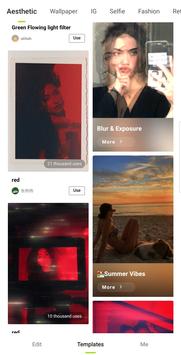
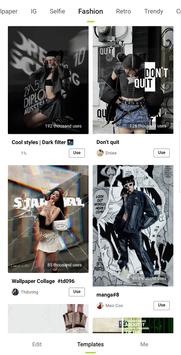
To create a cohesive visual theme, the app offers atmospheric filters such as Lofi, CCD Glow, Blue Hour, and Pink Afterglow. Each preset alters the overall color tone immediately, allowing quick side-by-side comparisons between warm retro effects and cool evening palettes. For precise control, manual adjustment tools let users tune basic image parameters including brightness, contrast, saturation, and sharpness. The editing workspace also supports cropping, rotation, collages, ready-made covers, and stickers to format images for specific social media layouts.
Your comment was submitted and is awaiting moderation.
Your comment was published.