App Screenshots




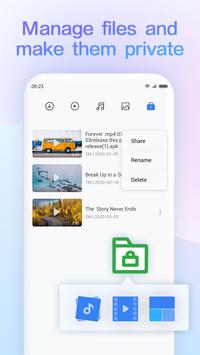

Mobile web browser and file manager
- Fixed bugs
Mi Browser serves as a full-featured web browser designed for daily navigation, online shopping, video playback, and general internet searches. Beyond standard web navigation, the app integrates dedicated tools for downloading media directly from popular social platforms, managing local media files, and maintaining privacy during private browsing sessions. It caters to users who want a single mobile interface that combines standard site navigation with practical file handling and media saving capabilities.
One of the app’s central capabilities is its built-in media downloader. Users can capture images and video content directly from platforms such as Facebook, Instagram, and Twitter while browsing. Additionally, it includes a feature specifically designed to save WhatsApp status updates, allowing users to keep local copies of media shared by their contacts without needing separate third-party extraction utility apps.
The app includes built-in file management utilities that organize locally stored audio files, videos, and images. For media that requires additional privacy, users can move sensitive items into a secure private folder. This system ensures that personal files remain isolated from general view while keeping storage management consolidated within the browsing interface.
For private web sessions, the incognito mode prevents the app from saving search history and browsing activity. This privacy mode features a specific control that allows users to toggle aggregated data collection on or off. This option gives individuals direct control over whether their session usage metrics are shared during private browsing.
To assist with global content, the app incorporates an instant inline translation feature. Users can select specific words on a web page to translate them on the spot, a capability currently supported for users in India, Indonesia, and Russia. Complementing this are alternative input and viewing options, including hands-free voice search, a dedicated Reading mode for text-heavy pages, a battery-friendly Dark mode, and built-in data saving settings.
Your comment was submitted and is awaiting moderation.
Your comment was published.