App Screenshots

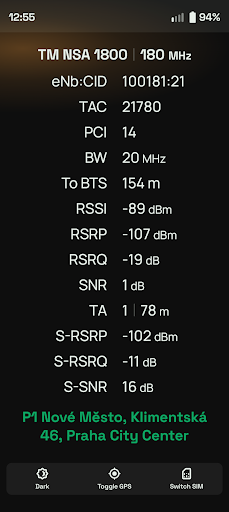

Mobile network signal monitor
🔓 Root support: lock bands, channels and even a single cell (PCI) on Qualcomm and MediaTek modems
📡 Rooted Qualcomm phones show TX power, RX antennas and MIMO rank of the serving cell
🧩 Rewritten cell matching: cells are paired with your imported database more reliably
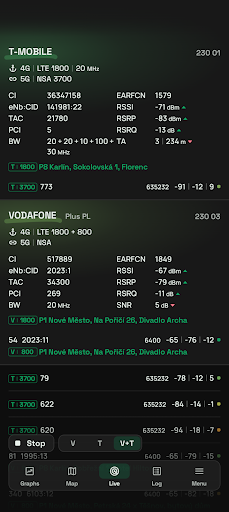
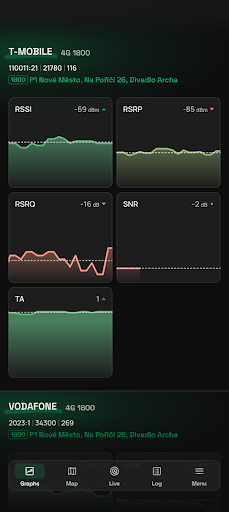
For users who need to analyze their cellular connection, NetMonster serves as a real-time monitor that collects and displays detailed mobile network telemetry. It provides a comprehensive snapshot of nearby cell towers, signal quality metrics, and the underlying network technologies currently serving your device. Rather than just showing a simple signal bar icon, the app identifies specific cell IDs, logs changes in reception, and maps out connection data to help you diagnose coverage issues during daily travel or stationary use.
The app detects and displays active connections across a wide array of mobile network standards, including GSM, CDMA, WCDMA, TD-SCDMA, LTE, 5G NSA, and 5G SA. It highlights advanced connectivity configurations as they happen, showing when LTE carrier aggregation is active or identifying whether a 5G NSA connection is fully established versus merely deployed in the surrounding area. Alongside raw network types, the interface provides metrics for signal strength and connection quality, accompanied by short notes that help interpret how current reception levels affect potential peak download and upload speeds.
NetMonster maintains an ongoing log of every cell tower your device connects to during a session. This continuous tracking makes it possible to review connection history over time, making it useful for testing coverage along a commute or conducting site visits. You can export these route logs for external analysis or use them to review where handoffs between different cell towers took place.
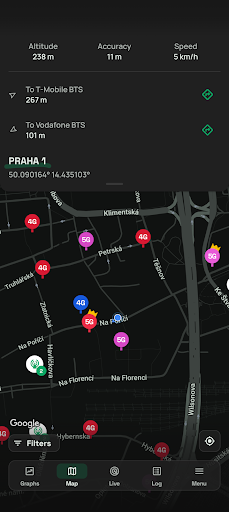
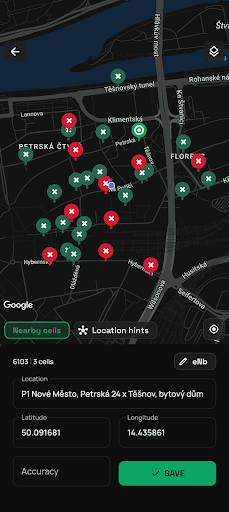
To help visualize signal data, the app plots approximate connection locations on a map using available local data. In supported regions where precise tower location databases exist, it can pinpoint exact cellular mast positions. If the automated local data is inaccurate or incomplete, you can manually fine-tune tower locations, filter specific network entries, and manage saved data to build a more accurate map of your local cellular infrastructure.
Your comment was submitted and is awaiting moderation.
Your comment was published.