App Screenshots



Unified search, summarization, and productivity utility
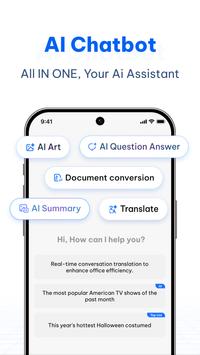
Seekee serves as an all-in-one productivity hub that unifies web searching, content summarization, document editing, and media customization around a central MegaSearch Bar. Instead of toggling between multiple specialized tools, you can launch search queries, transcribe voice recordings, convert file formats, and generate written drafts from a single interface. The app also features a personalized homepage feed that delivers real-time trending topics alongside tailored content updates.
At the core of the app is the MegaSearch Bar, which interprets natural language intent to help you process long-form online content quickly. Entering a query, pasting a link, or using voice input brings up targeted results paired with a Summarize feature that distills long web pages into key points. You can ask immediate follow-up questions to request comparisons, plain-language definitions, or extra sources without opening separate tabs. This workflow allows you to scan extensive research articles, draft translations, or start an email outline directly from the main search view.
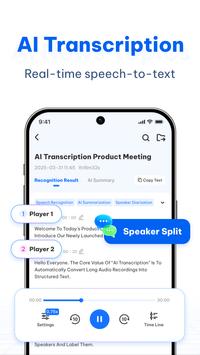
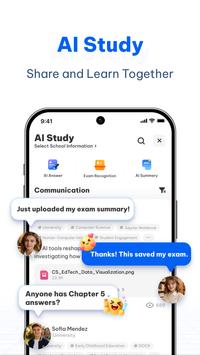
The built-in AI Toolkit handles text generation and audio processing for study or work tasks. It generates emails, reports, and social media captions while letting you adjust tone and length. For live meetings or lectures, the app records audio and converts speech into precise text transcripts, producing a one-tap summary that highlights action items, dates, and core takeaway points. If you encounter difficult study problems, capturing a photo of a question returns step-by-step explanations, supported by a built-in user community where you can browse extra examples and practical tips. Because the generated text is machine-produced, verifying facts independently remains necessary for graded or official work.
An integrated cloud workspace provides tools to manage digital documents across sessions. You can import PDFs to compress their file size or convert them between Word, Excel, and PDF formats, making it easier to reduce large files before emailing them or convert spreadsheets for signing while preserving layout integrity. The integrated storage supports both file name and full-text content search, making it simple to retrieve specific terms across archived notes, imported documents, and stored voice summaries.
Beyond text and documents, the app includes media tools to edit images without transferring files to desktop software. The image studio allows you to enhance overall photo quality, strip out backgrounds, erase unwanted watermarks, and format standard ID photos or promotional posters.
Your comment was submitted and is awaiting moderation.
Your comment was published.