App Screenshots

Shortcut creator for hidden internal screens
# Changelog
## Features
- Plugin system for launch and shortcut creation (docs & example on GitHub)
- Launch favorites using Quick Settings tile by @khaled-0
- Favorites and recently used activities
- Sharing of shortcuts via URL
- Translation updates
## Fixes
- Incremental loading should fix crashes due to binder buffer exhaustion
## Other improvements/changes
- Package cache
Accessing nested settings panels or deep feature screens often requires navigating through multiple submenus across different applications. Activity Launcher serves as a focused system utility that scans installed applications to expose their public internal activity pages, enabling direct access to specific screens without opening the full application first. Beyond revealing hard-to-reach configuration menus and deep options, it provides tools to bookmark frequently used pages, launch them from a Quick Settings tile, or pin them directly to the home screen as dedicated shortcuts.
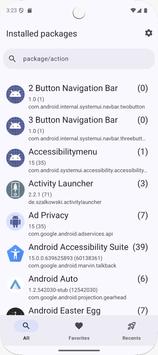
When opened, the app inspects installed packages to compile a comprehensive list of their system-exposed activity pages. Expanding any application entry reveals its internal components, allowing users to select and attempt to launch specific screens, such as a deeply hidden system configuration panel. Because the scan dynamically inventories every package on the device, the primary menu may take a moment to load upon launch. Some activity entries display technical or system-level names that do not immediately clarify their function, and certain pages may fail to launch if the host application or operating system restrictions block external access.
To avoid manually scrolling through extensive package lists, the app includes a dedicated search bar. Users can enter a partial setting name or filter by application title to pinpoint specific internal screens faster. This is particularly useful for repeating technical troubleshooting tasks or returning to a known configuration page. Because search queries rely on the activity labels provided directly by installed applications, some results may appear vague or overly technical. If search results yield inconsistent matches, expanding and browsing the full application list serves as an alternative method for locating a target screen.
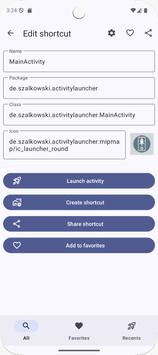
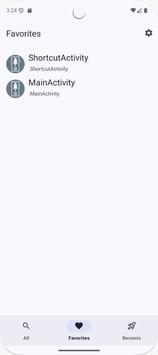
For frequently needed screens, the app provides several options to eliminate repetitive steps. Selected activities can be turned into custom home screen shortcuts for one-tap opening. Users can also tag specific pages as favorites, keep track of recently launched activities, or trigger saved favorite pages directly through a customizable Quick Settings tile.
Your comment was submitted and is awaiting moderation.
Your comment was published.