App Screenshots




AI-powered tool for photo enhancement and restoration.
Make your photos stand out with AI-enhanced editing on Remini! We’ve fixed some pesky bugs and made performance improvements to ensure a seamless experience. Love from the Remini team
Remini – AI Photo Enhancer is a media editing app designed to restore, unblur, and detail digital images and video clips. It specializes in single-tap improvements tailored for portraits, selfies, and group shots, utilizing algorithms to enhance facial features like eyes, hair, and skin micro-contrast without applying heavy or artificial-looking filters. Beyond basic enhancements, the application functions as an old photo restorer and includes an option to generate realistic AI Photos directly from everyday casual snapshots.
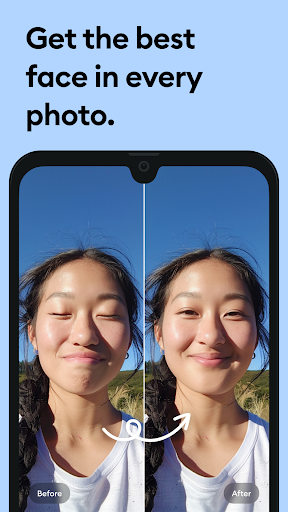
The core enhancement tool focuses on sharpening faces and refining textures in solo and group photography. Applying this process increases definition around eyes, hair strands, and facial features while avoiding a flat or overly smoothed appearance. Tools such as Face Enhance and Face Glow allow users to refine overall subject details, which is particularly useful for correcting backlit or slightly soft portraits. Real-time before-and-after previews let users evaluate side-by-side comparisons before saving the result. The tool performs best when human faces are clearly positioned within the frame and receive moderate lighting, as low-light or distant subjects yield less pronounced improvements.
For physical heritage albums and flatbed photo scans, the Old Photo Restorer addresses specific age-related imperfections like surface scratches, general blur, and tone fading. The algorithm reintroduces contrast lost during scanning and recovers definition in facial details. An integrated Auto Color feature can adjust the image temperature, adding soft warmth or reviving original film palettes while maintaining natural skin tones. For severely degraded or heavily creased prints, scanning the physical photo at a higher resolution before processing provides the algorithm with more source detail to work with.
To clean up everyday captures, dedicated Unblur & Sharpener and Denoiser utilities resolve camera shake, motion blur, and high ISO grain commonly found in low-light or indoor environments. These adjustments sharpen soft edges to make fine textures on clothing, background scenery, and signage more legible. For larger screens or printing needs, an integrated Image Enlarger can scale both static photos and video clips up to 2x, doubling the resolution while preserving sharpness across the image.
Your comment was submitted and is awaiting moderation.
Your comment was published.