App Screenshots

Cloud data synchronization tool
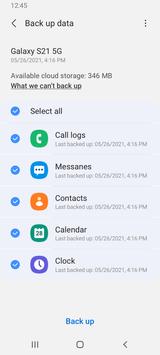
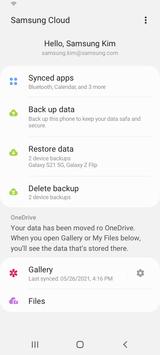
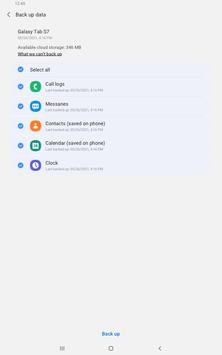
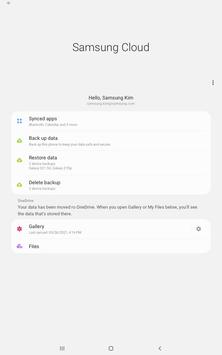
Samsung Cloud for Wear OS handles background data synchronization, backup, and device restoration for Samsung wearable hardware. It unifies cloud management into a single interface, allowing you to back up system settings, app configurations, Home screen layouts, call logs, messages, and clock preferences. When switching to a replacement device, these saved records restore your previous setup automatically. It also synchronizes day-to-day data across connected hardware, keeping contacts, calendar events, Samsung Notes, reminders, photos, videos, and internet browsing data consistent without manual file transfers.
The app automatically archives specific categories of device data to protect your setup against loss or during device upgrades. It backs up core system configurations alongside personal communications, including SMS and MMS messages, call history in the Phone app, and custom alarms or timers from the Clock app. It also saves your Home screen layout and installed app preferences. When you configure a new device, logging into your account allows you to pull down these stored archives to recreate your previous layout and settings without manually reconfiguring each option.
Beyond static system backups, the service continuously syncs active user data across all connected Samsung hardware. Updates made to Contacts, Calendar entries, Samsung Notes, Reminder lists, and Samsung Internet data update across your devices logged into the same account. Media sync for photos and videos operates through an integration with Microsoft OneDrive, requiring you to link your Samsung and Microsoft accounts to store and access your media library.
The background services and management interface rely on specific system conditions to process data. Settings and syncing functions operate exclusively on official Samsung hardware, and the app requires an active network connection alongside an authenticated Samsung account to process sync tasks or upload backups. To perform these functions, the app utilizes system permissions to access Contacts, Calendar entries, SMS and MMS Messages, and local Storage for temporary data caching during backup and transfer operations. Availability of the Microsoft OneDrive Gallery Sync feature varies depending on your country or mobile operator.
Your comment was submitted and is awaiting moderation.
Your comment was published.